

The Dead Leads in Your CRM Are Worth More Than Your New Ones
Here is a number worth sitting with: the average real estate agent has between 300 and 1,200 contacts in their CRM who never got a second follow-up after the first few touches. They came in from a Zillow form, an open house sign-in sheet, a Facebook ad, or a referral and then life got busy, the lead went quiet, and the agent moved on to the next new inquiry.
Those are not dead leads. They are dormant ones. And a well-timed SMS sequence can wake up a meaningful chunk of them in under 72 hours.
This is the database reactivation play, and it is one of the highest-ROI things a real estate agent or team can run right now, because the leads already exist. You have already paid for them. You just have not texted them at the right moment with the right message.
Why Does SMS Work for Database Reactivation?
SMS open rates consistently run between 90% and 98%, and most messages are read within three minutes of delivery. Compare that to email, where a 25% open rate is considered strong, and you start to understand why reactivation campaigns built around text messaging outperform almost every other re-engagement channel for real estate.
The other reason SMS works so well here is context. When someone gets a text from an agent they vaguely remember, it does not feel like marketing. It feels like a check-in. The format is inherently personal. If the message is written the right way, the lead's first reaction is often "oh right, I did reach out about that" rather than "who is this trying to sell me something."
What Is a Real Estate Database Reactivation Campaign?
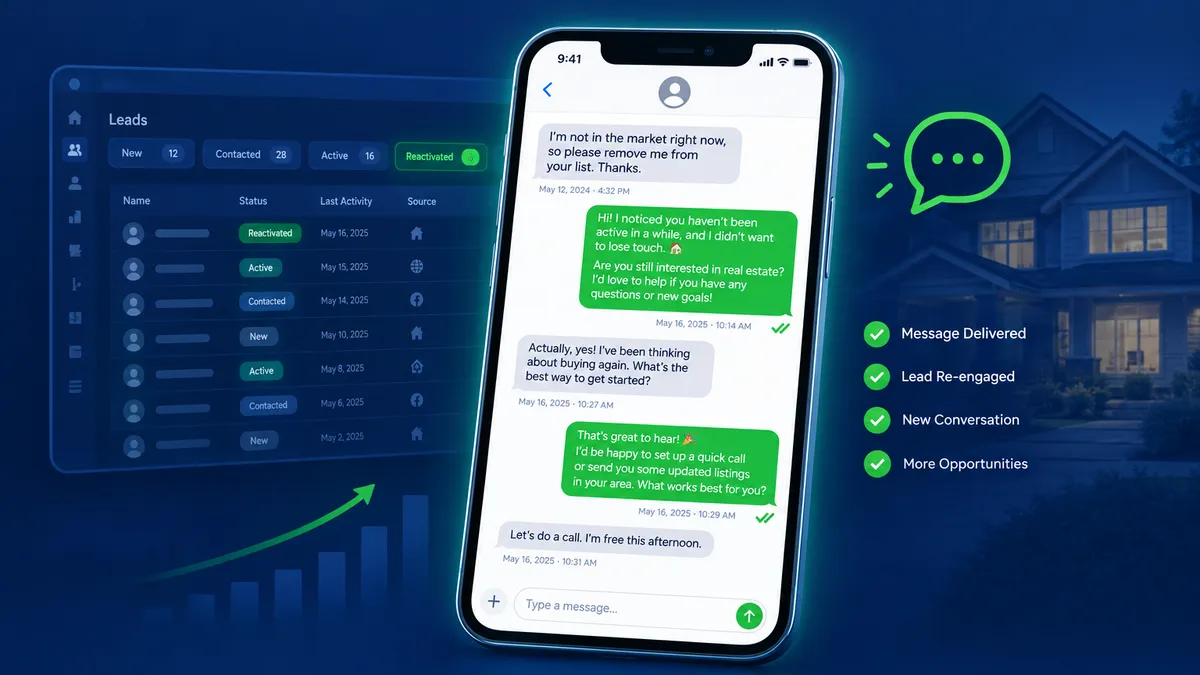
A database reactivation campaign is a structured SMS sequence sent to a segment of your existing CRM contacts who have not engaged in 30, 60, or 90-plus days. The goal is not to pitch them hard. The goal is to restart a conversation and find out where they actually are in their buying or selling journey.
A clean reactivation campaign usually follows this structure:
- Message 1 (Day 1): A warm, direct check-in referencing that they previously reached out. No hard sell. Just a simple, human opener that invites a reply.
- Message 2 (Day 3 to 4): A soft value add such as a market update, a relevant listing, or a question about whether their search criteria have changed.
- Message 3 (Day 7): A low-friction CTA offering to book a quick call, answer questions, or send over listings matching what they described when they first inquired.
- Message 4 (Day 14): A breakup-style message. Something like: "I do not want to keep reaching out if the timing is not right. Just let me know and I will give you space." These messages consistently generate replies because they create a moment of decision.
The key across all four: short, conversational, and written to sound like a person, not a marketing department.
How Do Real Estate Agents Set This Up Inside Their CRM?
With Leadengage connected to your CRM, setting up a database reactivation sequence does not require building it from scratch every time. You create the message sequence once inside an Action Plan, define the send windows so messages go out during appropriate hours, and then apply the plan to a segment of old contacts in bulk.
The practical workflow looks like this:
- Filter your CRM contacts by last activity date and pull everyone with no meaningful engagement in the last 60 or 90 days.
- Tag that segment in your CRM.
- Apply your reactivation Action Plan to the segment using Leadengage's mass-apply feature.
- The drip sequence runs automatically, respecting your send-window preferences so texts go out between 9 AM and 7:30 PM in your time zone.
- Replies land directly in your CRM inbox where you or your ISA can respond and continue the conversation.
Once set up, the sequence runs without you touching it. You check the inbox for replies, not for outgoing messages. Those handle themselves.
What Should the Messages Actually Say?
This is where most agents overthink it. The reactivation message that works is not clever or elaborate. Here is a real example of a Message 1 that consistently gets replies:
Hey [First Name], this is [Agent Name]. You reached out a while back about buying or selling in the area. Things got busy on both ends. Are you still thinking about making a move, or has that changed?
That is it. It is honest, it is brief, and it gives the lead a completely natural off-ramp if they have moved on. The ones who are still in-market will tell you. The ones who are not will often say so, which is just as valuable, because now you know not to spend any more time on them.
What does not work: long messages with listings attached, market stats paragraphs, or anything that sounds like it was written for a newsletter. If your reactivation text looks like marketing, it gets treated like marketing.
How Many Leads Can You Realistically Reactivate?
Results vary by database quality, how long the leads have been dormant, and how well the messages are written. Agents running consistent database reactivation campaigns through Leadengage typically see 5 to 12 percent of dormant contacts re-engage meaningfully within the first two weeks of a sequence. That means they reply, ask a question, or take a next step.
If you have 500 dormant contacts and 7 percent of them re-engage, that is 35 conversations restarted from a database you were otherwise ignoring. In a market where a single closed transaction can mean $8,000 to $15,000 in commission, the math on reactivating your own database is almost always better than buying new leads.
Reactivation Is Not a One-Time Event
The agents who see the biggest results from database reactivation treat it as a recurring cycle, not a one-time blast. They run a reactivation sequence once per quarter or once per major market shift across the portion of their database that has not been active.
Market conditions change. Someone who was priced out six months ago might be back in now. A seller who said "not yet" in the spring might be ready by fall. Life circumstances shift: divorces, job changes, growing families, downsizing parents. Your dormant database is a living list of people whose situation has probably changed since they first reached out.
A quarterly SMS reactivation sequence is how you find out which ones are ready now.
How Leadengage Makes Reactivation Automatic
Leadengage integrates natively with Follow Up Boss and other leading CRMs, which means your reactivation Action Plans trigger directly from the same contact records your team already works in every day. There is no separate tool to log into, no copy-paste process, and no manual tracking of who got which message.
The embedded app inside your CRM sidebar lets any agent on your team see exactly where a contact is in a reactivation sequence, pause it if they pick up the phone, or hand off to Conversation AI to keep the thread warm overnight. Every reply surfaces in your CRM inbox automatically, tagged and ready for your team to act on.
Related: How Real Estate Agents Use SMS Broadcast Campaigns to Fill Open Houses | How to Track Every Buyer and Seller Lead With a CRM Pipeline
Frequently Asked Questions
Is it okay to text old real estate leads who have not heard from me in months?
Yes, as long as you collected their contact information with appropriate consent through standard lead capture forms, open house sign-ins, and similar sources. If a contact has previously opted out of messaging, your CRM will flag them with a DND status and exclude them from any outgoing sequences automatically. Always honor opt-outs immediately.
How old is too old for a database reactivation campaign?
There is no hard cutoff, but response quality typically declines for leads that are more than 18 to 24 months dormant. That said, many agents have reactivated leads that are two or three years old when market conditions shift. A brief, non-aggressive check-in costs almost nothing to send.
What is the difference between a drip campaign and a database reactivation campaign?
A drip campaign is typically triggered when a new lead enters your CRM and runs as an ongoing nurture sequence. A database reactivation campaign targets existing contacts who went quiet. It is a re-engagement effort aimed at people already in your database rather than new inquiries.
How does Leadengage handle replies to reactivation messages?
Replies from your contacts route directly into your CRM inbox so you can see and respond without switching platforms. If you have Conversation AI enabled, the AI can handle initial replies, qualify the lead further, and flag hot responses for your team automatically.
Can I run a reactivation campaign across my whole database at once?
You can, but segmenting first works better. Separate buyer leads from seller leads, active searches from expired inquiries, and recent contacts from very old ones. Tailoring even slightly improves response rates and keeps your messages feeling personal rather than like a broadcast.
Your Next Best Lead Is Already in Your CRM
Most agents spend significant money every month on lead generation while ignoring the hundreds of leads they have already captured. The database reactivation strategy flips that math. You have already done the hard work of getting someone to raise their hand. Now it is about reaching back out at the right time with the right message.
Leadengage makes the mechanics of that simple. Set up your reactivation Action Plan once, apply it to your dormant contacts, and let the sequence run while you focus on the conversations that come back.
Ready to turn your old leads into your next closings? Start your free 14-day trial at Leadengage and run your first database reactivation campaign this week.