Leadengage Blog
Insights, Tips, and Updates on Text Automation and Follow Up Boss Integration
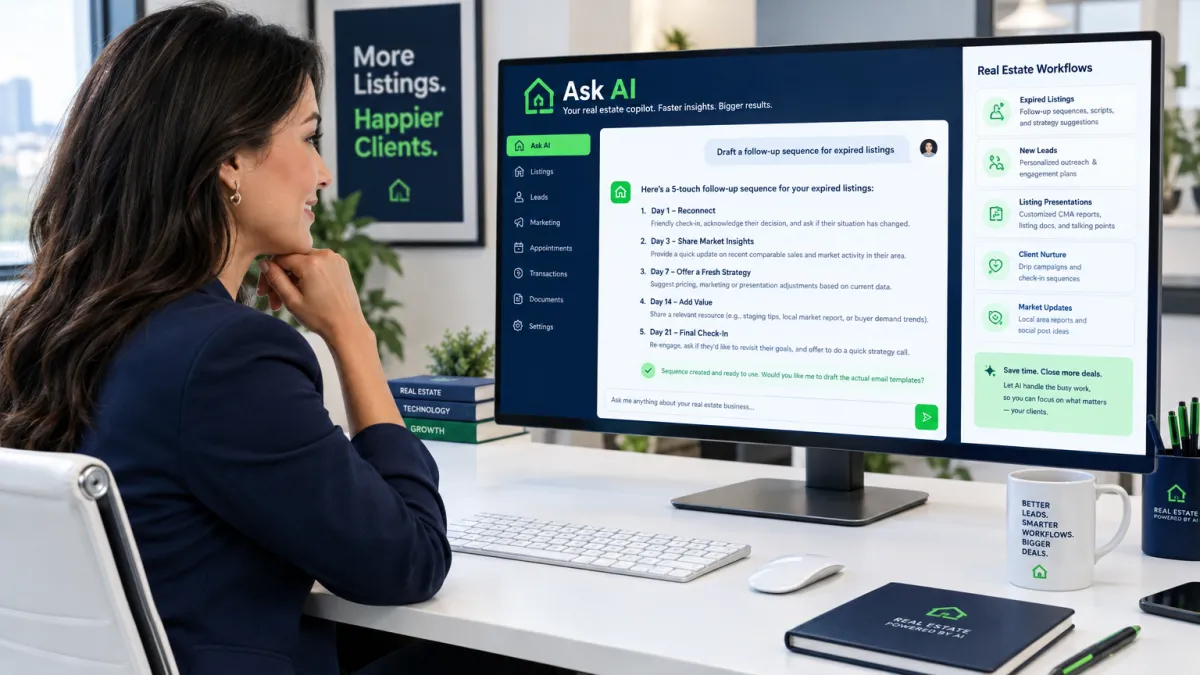
How Real Estate Agents Use Ask AI to Run Their Entire Follow-Up System With One Sentence
How Real Estate Agents Use Ask AI to Run Their Entire Follow-Up System With One Sentence
Most real estate agents have the same problem: they know they need better follow-up, but actually building a follow-up system feels like a project. Writing the texts, setting up the sequences, figuring out the triggers — it takes time that most agents just do not have between showings, negotiations, and everything else.
That is exactly what Ask AI is built to solve. Instead of clicking through menus and configuring automations manually, you just describe what you want in plain English — like you are talking to a colleague — and the system builds it for you.
Type a single sentence. Get a complete follow-up system. That is the short version. Here is how it actually works in practice.
What Is Ask AI — and Why Does It Matter for Real Estate Agents?
Ask AI is the conversational interface inside Leadengage AI Agents that lets you interact with your platform the way you would talk to a smart assistant. You describe an outcome, and the AI figures out how to build it.
For example, you could type: Create a 21-day text drip sequence for new buyer leads who came from a Facebook ad. Start soft, get more specific about their timeline by day 7, and ask for a call by day 14.
Ask AI reads that, generates the full sequence message by message with timing, and sets it up so it is ready to attach to your workflow. You review it, adjust anything you want, and activate it. The whole thing takes a few minutes instead of an afternoon.
This is not a chatbot that answers questions. It is an execution layer. The difference matters: Ask AI does not just talk about your pipeline — it works inside it.
Real Real Estate Use Cases Agents Are Running With Ask AI
The best way to understand Ask AI is to see what agents are actually using it for. These are the kinds of prompts real estate operators run every week.
Expired Listing Outreach Sequences
Expired leads are one of the highest-converting sources in real estate — if you get to them fast and stay consistent. The problem is most agents either follow up once or burn out manually dialing through a cold list.
With Ask AI, a listing agent can prompt: Build a 30-day outreach sequence for expired listing leads. Mix calls, texts, and voicedrops. Make the messaging empathetic in the first week and shift to value-focused by week three. The AI structures that entire campaign — contact timing, message angles, channel mix — and queues it up ready to deploy.
Open House Follow-Up Automation
Open houses generate leads in bursts, and most of those leads go cold within 48 hours if no one follows up. Ask AI can build a post-open-house follow-up sequence in seconds. Prompt it: Create a 7-day follow-up sequence for open house attendees. Day 1 should thank them for coming. Day 3 should ask if they have questions. Day 5 should mention similar properties. Day 7 should invite them to book a showing.
That sequence gets built, written, and staged — and next Saturday, every person who scanned your QR code at the open house enters it automatically.
Seller Lead Nurture for Long-Timeline Prospects
Not every seller lead is ready to list this month. Some are 6 to 12 months out, and most agents stop following up with them within a few weeks. Ask AI can build a long-form nurture track for these prospects: monthly market updates, equity check-in texts, and timely nudges timed around their stated move date.
One prompt creates months of consistent contact — without the agent manually writing a single message.
How Does Ask AI Know What to Build?
Ask AI uses the context you provide — lead type, goal, channel, tone, timeline — to generate workflows that map to how real real estate follow-up actually works. The more specific your prompt, the more dialed-in the output. But even a short, general prompt gets you a solid starting point you can refine.
The output connects directly to your Follow Up Boss pipeline and integrates natively with Follow Up Boss and other leading CRMs. Workflows Ask AI builds trigger off the same contact tags, stage changes, and action plans your team already uses. If you are already running Leadengage AI Agents to handle inbound leads and post-showing follow-up, Ask AI is how you build and update those agent workflows without touching a single settings screen.
Why Real Estate Agents Are Switching to This Approach
The traditional way to build a follow-up system in a CRM involves navigating nested menus, configuring triggers one by one, writing messages from scratch, testing timing, and often getting stuck halfway through and abandoning the whole thing.
Ask AI collapses that entire process into a conversation. You still make the decisions — what tone, what timing, what goal — but the AI does the construction work. For a solo agent or a lean team, that is the difference between having a follow-up system and not having one.
For teams and brokerages, it means your top producers best sequences can be recreated and standardized across agents in minutes. Instead of spending a half-day onboarding a new agent on your drip setup, you prompt Ask AI, review the output, and roll it out.
Is Ask AI Only for Building New Workflows?
No — and this is where it gets genuinely useful for agents who already have automations in place. Ask AI can also help you modify existing sequences. You can prompt things like: Take my current buyer nurture sequence and add a touchpoint on day 45 that mentions rising inventory in their target zip code — and it handles the edit.
You can also use it to troubleshoot, to write A/B variants of your existing messages, or to repurpose a sequence that has been working for buyers into a version tuned for sellers.
What Real Estate Operators Are Saying
Teams using Leadengage report that eliminating manual workflow setup is one of the biggest time savers in their week. When the barrier to building follow-up systems goes from a few hours of configuration to one sentence and a review, agents actually build them — and they actually use them. More follow-up means more conversations. More conversations close more deals from the database you already have.
Frequently Asked Questions About Ask AI for Real Estate
What is Ask AI in Leadengage?
Ask AI is a plain-English conversational interface inside Leadengage AI Agents that lets real estate agents describe a workflow, follow-up sequence, or automation goal in natural language. The AI builds the system based on your description — messages, timing, triggers, and all — without requiring manual configuration.
Do I need technical skills to use Ask AI?
No. Ask AI is designed so any real estate agent can use it without technical knowledge. If you can describe what you want to happen — like talking to an assistant — the AI handles the build. You review and activate the result.
Can Ask AI connect with Follow Up Boss?
Yes. Workflows and sequences that Ask AI builds connect to your Follow Up Boss pipeline through Leadengage native integration. Triggers, tags, and action plans all sync so the automation fires inside the CRM your team already uses.
What kinds of real estate workflows can Ask AI build?
Ask AI can build drip sequences, open house follow-up campaigns, expired listing outreach tracks, seller nurture sequences, post-closing review requests, database reactivation campaigns, and more. If you can describe the goal, Ask AI can structure a workflow around it.
How is Ask AI different from Conversation AI?
Conversation AI handles live, two-way conversations with leads — responding to inbound messages, qualifying prospects, and booking appointments automatically. Ask AI is the tool you use to build those automations and workflows. Think of Ask AI as the builder and Conversation AI as one of the tools it deploys.
Ready to describe your next follow-up system and have AI build it for you? Explore Leadengage AI Agents — including Ask AI, Conversation AI, Voice AI, and more — at leadengage.com/ai-agents.

Pricing
Affordable Plans, Starting At Just $149
Get powerful tools and seamless integration for as low as $149. Choose the plan that helps your business grow.
Frequently Asked Questions
Everything you need to know about Leadengage
Leadengage is an AI-powered marketing and communication platform built specifically for real estate agents, teams, and brokerages. It supercharges Follow Up Boss with automated drip texting, Voice AI, social media message integration, broadcast campaigns, review automation, and dozens of other tools — all designed to help you convert more leads and close more deals from the database you already have.
Trusted by 500+ FUB teams across the U.S. and Canada.
Most of Leadengage's core features — including drip texting through FUB Automations, the FUB Embedded App, and social message integration — are built around Follow Up Boss. However, if you're not currently using FUB, our Platform Plan gives you access to a wide range of standalone features including AI automations, website and funnel builder, social media planner, email marketing, and more.
Leadengage is purpose-built for FUB users and delivers the most value when connected to your FUB account.
Getting started is simple! After signing up, you'll connect your Follow Up Boss account, complete a one-time A2P/10DLC number registration (required for SMS compliance), and install the Leadengage Embedded App in FUB. Most agents are up and running within 3 business days after A2P approval.
Visit leadengage.com/onboarding for our full setup guide, or reach out to our team for personalized help. For done-for-you setup and FUB Automation creation, we recommend working with Kee Technology Solutions.
Yes! Leadengage works in both the United States and Canada. Canadian agents and teams can use all core features including drip texting, social message integration, and the FUB Embedded App. Local Canadian phone numbers are used for messaging, and applicable carrier compliance rules apply.
A2P/10DLC registration is not required for Canadian numbers, but is available if you need to text U.S.-based numbers.
Leadengage offers four main plans to fit solo agents, small teams, and large brokerages:
- Messaging Plan — Automated drip texting and FUB integration for solo agents and small teams. Up to 5 users. Includes a monthly usage credit. 7-day free trial.
- Automation Plan — Everything in Messaging, plus AI automations, ad manager, social planner, and advanced tools. Up to 15 users. Includes a monthly usage credit. 14-day free trial.
- All-In-One Platform Plan — Best value for mid to large teams. Replaces multiple tools with one comprehensive platform. Up to 30 users. Includes a monthly usage credit. 14-day free trial.
- Enterprise — Custom plan for large teams and brokerages with unlimited users and custom usage. Contact us for details.
All plans are available monthly or annually. Annual plans save the equivalent of 2 months. Visit our pricing page for current rates and a full plan comparison.
Conversational AI is available as an add-on on all plans (select the AI Agents plan at checkout alongside your base plan). Leadengage Blue plans with iMessage phone service can be found at leadengageblue.com.
Yes! The Messaging Plan comes with a 7-day free trial, and both the Automation and Platform Plans include a 14-day free trial. No setup required to start.
Please note: any usage charges (SMS, calls, AI, etc.) incurred during your trial are not covered by included wallet credits and will be billed separately. The trial ends early if you'd like our team to submit your A2P/10DLC registration.
Free trials are not available for the Leadengage Blue (iMessage) or AI Agent add-on plans.
Yes — monthly plans have no long-term contracts and can be canceled at any time. Annual plans are billed upfront and provide access for the full year. If you request early cancellation on an annual plan, any refund will be prorated based on the monthly rate for months used.
Note that Leadengage Blue (iMessage integration) requires a 3-month minimum commitment. If you have questions about your plan or cancellation, contact our support team at leadengage.com/contact-us.
No. Leadengage charges one flat subscription fee per Follow Up Boss account — regardless of how many FUB users you have. All users within your FUB account get access to the Leadengage Embedded App and drip texting through FUB Automations at no extra cost. Leadengage platform access and the Call Connect feature are limited to the user count included in your plan (Messaging – 5 users, Automation – 15 users, Platform – 30 users).
The only other variable cost that may apply is if your team's messaging volume exceeds your plan's included monthly wallet credits. Many teams never exceed their included credits. Visit leadengage.com/pricing for credit amounts by plan and leadengage.com/usage for current usage rates.
We recommend limiting full platform access (leads, billing, and communications) to the team owner and admin/operations manager only.
Yes — Leadengage is purpose-built for Follow Up Boss. It includes an Embedded App within the FUB sidebar for quick access to features, enables automated drip texting directly inside your FUB Automations, and routes incoming messages from social media and your website chat widget into your FUB contact records. Most Leadengage features work through FUB notes, which are converted into SMS messages that appear as Inbox App Conversation texts in Follow Up Boss.
Not on Follow Up Boss? The Platform Plan gives you access to a full suite of standalone features.
Leadengage works inside Follow Up Boss by recognizing special command codes placed in your FUB Automation notes. To send a text, add the [SMS] command at the start of a note, followed by your message. For example:
When the automation runs, Leadengage sends the message through your Leadengage number, automatically filling in merge fields and removing the [SMS] tag. Texts are delivered during smart send windows:
- Daily send window: 9:15 am – 7:45 pm (your local time zone)
- Messages scheduled outside this window are held and sent the next morning at 9:15 am
- Texts are also held on holidays or on any days of the week you've set to skip in your FUB Embedded App "User" preferences, and delivered the next business day
You can also schedule texts with timed delays — [15min], [1hr], [2hr] — or at specific times of day such as [9:30am] or [1pm] using additional timing commands. For a full list of commands, visit leadengage.com/help.
Yes! Through our Leadengage Blue product, you can send and receive iMessages directly within Follow Up Boss. This gives your messages a more personal, blue-bubble appearance and can improve engagement by bypassing standard SMS carrier filtering.
iMessage integration is available as an add-on or standalone plan and requires a 3-month minimum commitment. Learn more at leadengageblue.com.
SMS messages are delivered in segments. One standard segment is up to 160 characters of plain text. If your message is longer than 160 characters, it's automatically split into multiple segments — and each segment counts toward your usage credits. A few things to keep in mind:
- Special characters — like smart quotes, em dashes, or emojis — trigger Unicode encoding, which reduces the per-segment character limit to 70 characters.
- Most standard conversational text messages fit within one or two segments.
- Usage credits are deducted per segment sent, not per message.
Tip: Keeping your messages concise and avoiding special characters helps stretch your included monthly credits further.
A2P (Application-to-Person) refers to automated text messages sent from software to mobile devices — which is exactly how Leadengage sends your drip texts and campaigns. 10DLC (10-Digit Long Code) is the carrier registration system required by all major U.S. carriers for A2P messaging.
When you sign up, you'll complete a one-time 10DLC registration to verify your business identity with the carriers. This is not unique to Leadengage — it's an industry-wide requirement for all SMS platforms. Registration improves message deliverability for your business and helps protect consumers from spam.
Our onboarding guide at leadengage.com/onboarding walks you through the full registration process.
Every Leadengage plan includes a monthly Wallet Credit that covers the cost of communications and AI features — including SMS, phone calls, voicemail drops, email, and AI-powered conversations. Credit amounts vary by plan — visit leadengage.com/pricing for a full breakdown.
Credits are deducted as you use features. Higher-tier plans carry lower per-use rates, so your credits go further dollar-for-dollar. Many agents and teams never exceed their included credits. You can monitor your usage balance in your account dashboard and view current rates at leadengage.com/usage.
Important: Usage charges incurred during your free trial period are not covered by wallet credits and will be billed separately.
If your team exceeds your included Wallet Credit, additional usage is billed automatically at standard carrier and AI processing rates. There are no surprise fees, no penalties, and no interruptions to your service — you simply continue as normal and pay only for the additional usage you actually consume.
Platform Plan members enjoy the lowest overage rates. You can review all usage pricing at leadengage.com/usage and monitor your balance anytime in your account dashboard.
Social Messages to Follow Up Boss
Leadengage currently supports one Facebook Business login to connect multiple pages, any Instagram Professional accounts connected to that Facebook page, and one Google login with as many Business Profiles. Messages from Facebook and Instagram appear directly in your FUB contact records, and you can reply using the Leadengage Embedded App or mobile shortcuts. Our auto-tagging feature lets you automatically route incoming social leads to specific team members.
Note: Personal social profiles are not supported.
Social Planner (Automation & Platform Plans)
The Social Planner lets you connect and post to multiple accounts simultaneously. Supported platforms:
- Facebook Business Pages & Reels
- Instagram Professional Accounts (Posts, Stories, and Reels)
- Google My Business (up to 10 locations)
- LinkedIn Pages and Profiles
- TikTok personal profiles (business accounts coming soon)
You can post immediately or schedule content in advance, and add an initial follow-up comment on Instagram and Facebook posts.
No limit. You can add the Leadengage Chat Widget to as many websites or pages as you like. You can also create and customize multiple chat widgets — each with different branding, messaging, or lead routing — for different sites, pages, or purposes. Conversations that start through the chat widget forms are converted to SMS and routed into Follow Up Boss.
Not by default — you stay in control of your conversations. Leadengage handles the sending and timing of your drip texts based on your FUB Automations, but when a lead replies, you decide how to respond. You can manage replies directly in Follow Up Boss, use the Leadengage Embedded App, or respond from the mobile app.
However, if you'd like AI to handle initial conversations on your behalf, you can add Conversation AI as an optional add-on. Conversation AI can qualify leads, answer common questions, and book appointments — 24/7 without any manual involvement. Visit our pricing page for add-on details.
Conversation AI is an optional add-on that uses AI to respond to incoming messages on your behalf. When a lead replies to a drip text or reaches out through any of your connected channels, the AI takes over the conversation — qualifying the prospect, answering frequently asked questions, and booking appointments when the lead is ready.
AI usage is billed from your monthly wallet credits at variable rates based on the model selected. Visit leadengage.com/pricing for add-on pricing and leadengage.com/usage for full AI rate details.

Hear From Our Clients

Integrating FUB and leadngage has been a game changer for my business. It automates all my outbound texting, and has helped me convert tons of leads!
Eileen H
Keller Williams

Before adding Leadngage to Follow Up Boss, we were missing inbound conversations and opportunities from our website, social media, and text inquiries because we were juggling multiple apps. Now, everything is managed seamlessly within Follow Up Boss, all in one place.
Jeremy S
EXP
Our team is thrilled with Leadngage. We've saved money by no longer needing VAs to copy and paste text templates to new leads—everything is automated now.
Brian G
Remax