

How Real Estate Teams Use Round-Robin Booking to Fill Every Agent's Calendar Automatically
Here is the problem most team leads do not talk about out loud: the agents who are fast, loud, or physically closest to the office get the leads. Everyone else waits. The result is a lopsided pipeline, burned-out top performers, and junior agents who never get a fair shot at building their business.
Round-robin calendar booking solves this completely. Instead of whoever grabs the phone first, your system rotates every inbound appointment request across your active agents in sequence — automatically, fairly, and without you lifting a finger.
Inside Leadengage, this is built into your calendar setup and connected directly to your booking links, funnels, and follow-up automations. Here is exactly how it works and why your team needs it running before your next lead wave hits.
What Is Round-Robin Calendar Booking for Real Estate Teams?
Round-robin booking is a calendar configuration where inbound appointment requests are distributed evenly across a group of agents in rotation. Lead one goes to Agent A. Lead two goes to Agent B. Lead three goes to Agent C. Then it starts again from Agent A.
You set the rules once. The system handles distribution forever. No manager manually assigning leads. No agent inbox getting buried while another sits empty.
In real estate, this matters enormously. Buyer inquiries, seller consultations, and showing requests all come in waves — open houses, new listings, Facebook ad campaigns. When 40 leads come in on a Saturday morning, you do not have time to hand-assign each one. Round-robin does it automatically so every appointment lands on someone's calendar in under 60 seconds.
How Does It Work Inside Leadengage?
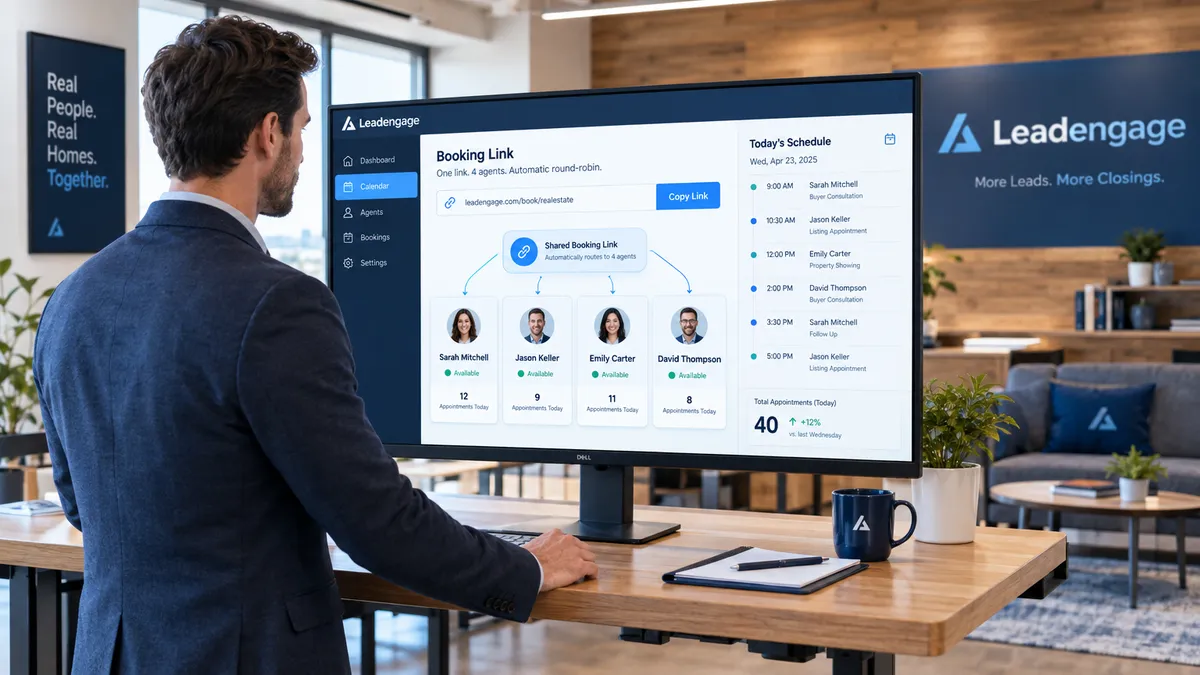
The setup is straightforward. Inside your Leadengage account, you create a team calendar and add your agents as members. You set each agent's available hours, buffer time between appointments, and maximum daily bookings. Then you publish a single shared booking link — for your website, your ads, your follow-up texts, or your funnels.
When a lead clicks and books, Leadengage checks who is next in the rotation and who has availability at the requested time. It assigns the appointment to that agent automatically, fires a confirmation to the lead, and sends a calendar notification to the agent — all without anyone touching it manually.
You can also layer in priority rules. If a lead already has a contact record assigned to a specific agent in your CRM, Leadengage can route the booking to that agent instead of continuing the rotation. This keeps existing relationships intact while still using round-robin for all fresh inbound leads.
Why Agents Consistently Show Up to Round-Robin Appointments
One thing that kills team morale fast is when agents feel like certain leads are being funneled to favorites. Round-robin is visible, objective, and fair. Every agent can see they are getting their rotation. That transparency builds trust in the system and in leadership — and it gets agents to actually answer their phones and show up, because they know the lead arrived legitimately.
It also protects the leads themselves. When a buyer books a showing time and gets an immediate confirmation with the agent's name and contact details, the experience feels professional. There is no awkward delay while someone at the office decides who to assign it to. The lead gets a real person attached to their appointment before they even hang up.
Real Estate Use Cases Where This Wins Every Time
Is round-robin booking good for open house follow-up?
Yes — this is one of the highest-value use cases. After an open house, you may have 30 or 40 sign-ins. Instead of one agent following up with all of them or trying to divide the list manually, your Leadengage automation sends a follow-up text to every contact with a booking link attached. As leads click and schedule, the appointments distribute themselves across the team automatically. No agent gets buried, no lead gets ignored.
Can I use this for expired listing cold outreach?
Absolutely. When your Leadengage AI Agents reach out to expired listing contacts via SMS or voice, any interested seller who wants to book a listing consultation clicks a link and self-schedules. That booking goes to the next agent in the rotation — or to the agent who owns that specific outreach campaign, depending on how you configure it.
What about buyer consultation scheduling from ad leads?
This is the most common setup. You run a Facebook or Google ad, the lead lands on a Leadengage funnel page, and the funnel's CTA triggers an automated SMS. That text includes a booking link. When the lead books a buyer consult, it drops directly onto the next available agent's calendar via round-robin. Your acquisition cost stays the same but no lead ever falls through because of an assignment delay.
What Happens When an Agent Is Unavailable?
Leadengage skips agents who have no availability at the requested time and moves to the next eligible agent in the rotation. If you set a maximum daily appointment cap per agent, the system respects that limit and routes to the next available person. This means your team calendar always works with real constraints, not just theoretical schedules.
You can also set up agent-level buffer rules — for example, no back-to-back showings, or a 30-minute minimum between appointments. Those preferences are baked into the round-robin logic so the system never double-books or overschedules anyone.
Integrates Natively With Follow Up Boss and Other Leading CRMs
If your team runs Follow Up Boss, Leadengage syncs calendar activity back to your CRM automatically. When an appointment is booked through round-robin, the lead record in your CRM gets updated with the assigned agent, the appointment time, and the booking confirmation details. No duplicate data entry. No missed contact records. Your pipeline and your calendar stay in sync without anyone managing it manually.
This also means your follow-up automations trigger correctly. If you have a pre-showing reminder sequence set up, it fires based on the appointment that was just booked — with the right agent's name in the message, routed through the right contact record.
How to Set Up Round-Robin Booking in Leadengage Today
Getting this live takes less than an hour. Here is the basic workflow:
- Create a team calendar inside Leadengage and add each agent with their availability and preferences.
- Set your distribution rules — pure rotation, weighted by agent seniority, or CRM-owner routing for existing contacts.
- Copy your shared booking link and drop it into your funnel CTAs, follow-up SMS templates, and website pages.
- Connect your CRM so that every booked appointment updates the right contact record automatically.
- Turn on confirmation automations so leads and agents both get instant notification the moment a booking is confirmed.
From that point forward, every inbound appointment request routes itself. You manage the rules, the system handles the distribution.
FAQ: Round-Robin Booking for Real Estate Teams
Can I limit how many appointments an agent gets per day?
Yes. Leadengage lets you set daily maximums per agent. Once an agent hits their cap, the system skips them in the rotation until the next day or until you manually reset their limit.
What if I want to prioritize certain agents for certain lead sources?
You can create separate team calendars by lead source or campaign. Each calendar has its own agent pool and rotation rules, so your top closers get your hottest ad leads while your newer agents get the longer-nurture traffic.
Does round-robin work with Leadengage AI Agents?
Yes. When a Leadengage AI Agent qualifies a lead and the lead is ready to book, the agent can drop the round-robin booking link directly into the conversation. The lead self-schedules and the appointment distributes automatically.
Can a lead pick a specific agent to meet with?
You control this. You can publish individual agent booking links alongside the shared team link, giving leads the option to choose a specific agent or let the system assign one for them.
Does this work for listing consultations as well as buyer showings?
Yes. You can create separate calendars for listing appointments and buyer showings, each with its own round-robin pool. Seller leads book listing consults, buyer leads book showing tours — different pools, different agents, all automated.
Your team should not be competing internally for the same leads. Round-robin calendar booking inside Leadengage gives every agent a fair shot, fills every calendar automatically, and keeps your pipeline moving without the chaos of manual assignment.
Ready to stop assigning leads by hand? See how Leadengage calendar automation works for your team at leadengage.com →