Leadengage Blog
Insights, Tips, and Updates on Text Automation and Follow Up Boss Integration
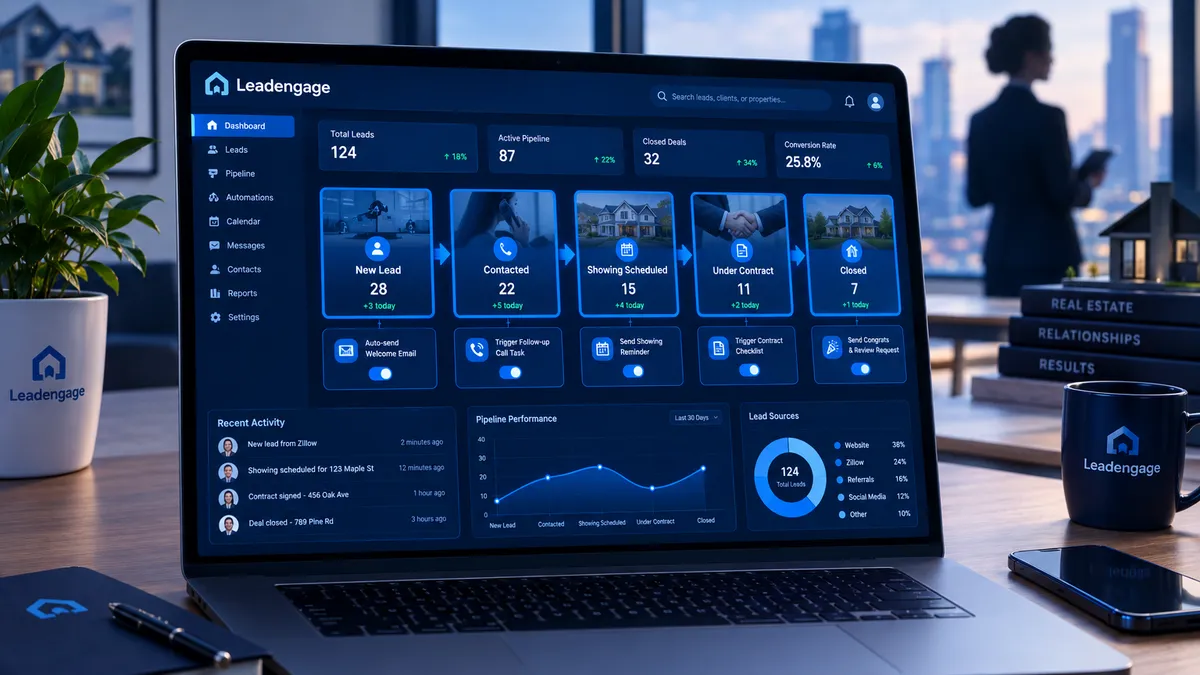
How Automated Pipeline Stage Triggers Help Real Estate Agents Follow Up Faster and Close More Deals
How Automated Pipeline Stage Triggers Help Real Estate Agents Follow Up Faster and Close More Deals
You moved a lead into Showing Scheduled. Did your CRM do anything about it? If the answer is no — no text sent, no task created, no confirmation email fired — you just did the hard work of moving the deal forward and got nothing back from your system.
That is the gap between agents who use a pipeline to track deals and agents who use it to drive deals. Leadengage pipeline stage triggers close that gap. The moment a contact moves from one stage to the next, an automated action fires. A text goes out. A task gets created. A follow-up sequence starts. You do not have to think about it, and you definitely do not have to do it manually.
Here is exactly how it works and what it looks like in practice for real estate teams of every size.
What Is a Pipeline Stage Trigger?
A pipeline stage trigger is an automation rule attached to a specific deal stage inside your CRM. When a contact card moves into that stage — whether you drag it manually, an AI agent moves it, or an inbound form populates it — the trigger fires instantly.
The trigger can send a text message to the lead, send an email to the lead or an internal team member, create a follow-up task for the assigned agent, start or stop a drip sequence, update a custom field or tag in the contact record, or fire a webhook to sync data to a connected platform.
The result: your pipeline stops being a passive scoreboard and starts being an active follow-up machine.
Why Does This Matter for Real Estate Specifically?
Real estate deal cycles are long, multi-touch, and full of moments where a timely message makes or breaks the outcome. Most of those moments do not require a custom message — they require a fast one. A showing confirmation. A contract reminder. A check-in text three days before closing. These are not things that need an agent's creative input. They need to happen on time, every time.
When you are juggling 30 active deals, a showing that afternoon, and a listing presentation tonight, you are not going to remember to send every one of those messages. That is not a discipline problem. That is a capacity problem — and automating pipeline stage actions is how you solve it at the system level.
A Real-World Real Estate Pipeline Setup
Stage 1: New Lead
Trigger fires immediately within 60 seconds — a personalized text goes out, a 14-day nurture drip starts in the background, and a task is created for the assigned agent to call within two hours.
Stage 2: Contacted
Trigger fires to stop the initial drip sequence so the lead does not keep getting follow-up texts after you have already spoken. A task is created to schedule a buyer consultation or property tour within 48 hours.
Stage 3: Showing Scheduled
Trigger fires a confirmation text immediately. Twenty-four hours before the showing, a reminder text fires automatically. After the showing, a follow-up text triggers asking for feedback on the property.
Stage 4: Active Offer
Trigger fires an internal notification to the transaction coordinator. An email goes to the client explaining next steps. A task is created to request proof of funds or pre-approval if not already on file.
Stage 5: Under Contract
Trigger fires a congratulations text to the client. An internal task fires to initiate the transaction checklist. A drip sequence starts with contract milestone reminders covering the inspection deadline, appraisal window, and clear-to-close notification.
Stage 6: Closed
Trigger fires a congratulations message to the client. A review request text fires 24 hours later asking for a Google or Zillow review while excitement is still fresh. The contact is tagged as a past client and a long-term nurture sequence starts for referral and repeat business.
How Does This Work With Your Existing Follow Up Boss Setup?
Leadengage integrates natively with Follow Up Boss and other leading CRMs. Your contact data, deal stages, and pipeline activity sync in real time. That means you can build pipeline stage triggers inside Leadengage that respond to stage changes happening in your Follow Up Boss account — without rebuilding your entire workflow or switching platforms.
Agents already running Follow Up Boss pipelines can layer Leadengage automation on top of their existing setup. When a lead moves stages in your Follow Up Boss account, Leadengage sees it and fires the connected action. No manual exports. No double entry. The two systems work together so your automation is always current.
What Real Agents Are Getting Wrong
The most common mistake is building a pipeline with six stages and zero triggers. Agents drag cards from column to column and feel like they are managing their pipeline — but the pipeline is not doing any work. It is just a visual report.
The second most common mistake is building triggers for the early stages but ignoring the late stages like Under Contract and Closed. That is where some of the highest-value touchpoints live. A well-timed congratulations text the day a deal closes, followed by a review request 24 hours later, is one of the highest-ROI automations in real estate — and most agents do it manually or not at all.
What About Leads Who Move Backward?
Real estate does not always go forward. Buyers fall out. Contracts fall through. Leadengage handles this too. You can build stage triggers that fire when a contact is moved back into an earlier stage — a re-engagement text, a soft check-in, or a task to call within 24 hours. The pipeline becomes a complete response system, not just a forward-only tracker.
Setting It Up in Leadengage
Inside Leadengage, pipeline stage triggers are built inside your workflow automation builder. You select the trigger type, choose the specific stage, and then add the actions you want to fire. You can stack multiple actions on a single trigger: a text, a task, and an internal notification all from the same rule. Changes take effect immediately and apply to any contact that hits that stage going forward.
For teams, you can also route the trigger actions to the assigned agent on the deal — so the right person gets the task and the right number sends the message, even when you have 15 agents sharing the same pipeline.
Internal links: How Real Estate Agents Use a Deal Pipeline to Track Every Buyer and Seller Lead | How Real Estate Agents Use Ask AI to Run Their Entire Follow-Up System | How Real Estate Agents Use Automated Calendar Booking
Frequently Asked Questions
Can I attach multiple actions to a single pipeline stage trigger?
Yes. A single stage trigger can send a text, create a task, send an email, and start a drip sequence simultaneously. You build the action stack inside the workflow builder and all of them fire the moment the stage changes.
Does this work if my team is using Follow Up Boss for the pipeline?
Yes. Leadengage integrates natively with Follow Up Boss. Stage changes in your Follow Up Boss pipeline can trigger Leadengage automations, and data syncs in real time between the two platforms.
What happens if I move a contact back to an earlier stage?
You can build separate triggers for backward stage movement. If a contact is moved back to New Lead or Active, you can fire a re-engagement text or create a call task automatically.
Can I set a delay on a stage trigger action?
Yes. Actions do not have to fire instantly. You can set delays — for example, send a review request 24 hours after a contact hits the Closed stage rather than the moment the card is moved.
What is the difference between pipeline stage triggers and regular drip sequences?
A drip sequence runs on a time-based schedule from enrollment. A pipeline stage trigger fires based on a deal event — when a specific thing happens in the pipeline. They complement each other: drip sequences handle ongoing nurture, while stage triggers handle action-specific moments in the deal cycle.
The Bottom Line
A pipeline with no triggers is just a whiteboard. A pipeline with stage triggers is an automated follow-up system that works even when you do not. Every deal stage becomes a moment where your CRM takes action on your behalf — sending the right message, creating the right task, and keeping the deal moving forward without you having to think about it.
If you are already tracking deals in Leadengage or Follow Up Boss, adding pipeline stage triggers is the next layer that turns tracking into closing.
Ready to put your pipeline to work? Start your Leadengage free trial and build your first pipeline stage trigger today.

Pricing
Affordable Plans, Starting At Just $149
Get powerful tools and seamless integration for as low as $149. Choose the plan that helps your business grow.
Frequently Asked Questions
Everything you need to know about Leadengage
Leadengage is an AI-powered marketing and communication platform built specifically for real estate agents, teams, and brokerages. It supercharges Follow Up Boss with automated drip texting, Voice AI, social media message integration, broadcast campaigns, review automation, and dozens of other tools — all designed to help you convert more leads and close more deals from the database you already have.
Trusted by 500+ FUB teams across the U.S. and Canada.
Most of Leadengage's core features — including drip texting through FUB Automations, the FUB Embedded App, and social message integration — are built around Follow Up Boss. However, if you're not currently using FUB, our Platform Plan gives you access to a wide range of standalone features including AI automations, website and funnel builder, social media planner, email marketing, and more.
Leadengage is purpose-built for FUB users and delivers the most value when connected to your FUB account.
Getting started is simple! After signing up, you'll connect your Follow Up Boss account, complete a one-time A2P/10DLC number registration (required for SMS compliance), and install the Leadengage Embedded App in FUB. Most agents are up and running within 3 business days after A2P approval.
Visit leadengage.com/onboarding for our full setup guide, or reach out to our team for personalized help. For done-for-you setup and FUB Automation creation, we recommend working with Kee Technology Solutions.
Yes! Leadengage works in both the United States and Canada. Canadian agents and teams can use all core features including drip texting, social message integration, and the FUB Embedded App. Local Canadian phone numbers are used for messaging, and applicable carrier compliance rules apply.
A2P/10DLC registration is not required for Canadian numbers, but is available if you need to text U.S.-based numbers.
Leadengage offers four main plans to fit solo agents, small teams, and large brokerages:
- Messaging Plan — Automated drip texting and FUB integration for solo agents and small teams. Up to 5 users. Includes a monthly usage credit. 7-day free trial.
- Automation Plan — Everything in Messaging, plus AI automations, ad manager, social planner, and advanced tools. Up to 15 users. Includes a monthly usage credit. 14-day free trial.
- All-In-One Platform Plan — Best value for mid to large teams. Replaces multiple tools with one comprehensive platform. Up to 30 users. Includes a monthly usage credit. 14-day free trial.
- Enterprise — Custom plan for large teams and brokerages with unlimited users and custom usage. Contact us for details.
All plans are available monthly or annually. Annual plans save the equivalent of 2 months. Visit our pricing page for current rates and a full plan comparison.
Conversational AI is available as an add-on on all plans (select the AI Agents plan at checkout alongside your base plan). Leadengage Blue plans with iMessage phone service can be found at leadengageblue.com.
Yes! The Messaging Plan comes with a 7-day free trial, and both the Automation and Platform Plans include a 14-day free trial. No setup required to start.
Please note: any usage charges (SMS, calls, AI, etc.) incurred during your trial are not covered by included wallet credits and will be billed separately. The trial ends early if you'd like our team to submit your A2P/10DLC registration.
Free trials are not available for the Leadengage Blue (iMessage) or AI Agent add-on plans.
Yes — monthly plans have no long-term contracts and can be canceled at any time. Annual plans are billed upfront and provide access for the full year. If you request early cancellation on an annual plan, any refund will be prorated based on the monthly rate for months used.
Note that Leadengage Blue (iMessage integration) requires a 3-month minimum commitment. If you have questions about your plan or cancellation, contact our support team at leadengage.com/contact-us.
No. Leadengage charges one flat subscription fee per Follow Up Boss account — regardless of how many FUB users you have. All users within your FUB account get access to the Leadengage Embedded App and drip texting through FUB Automations at no extra cost. Leadengage platform access and the Call Connect feature are limited to the user count included in your plan (Messaging – 5 users, Automation – 15 users, Platform – 30 users).
The only other variable cost that may apply is if your team's messaging volume exceeds your plan's included monthly wallet credits. Many teams never exceed their included credits. Visit leadengage.com/pricing for credit amounts by plan and leadengage.com/usage for current usage rates.
We recommend limiting full platform access (leads, billing, and communications) to the team owner and admin/operations manager only.
Yes — Leadengage is purpose-built for Follow Up Boss. It includes an Embedded App within the FUB sidebar for quick access to features, enables automated drip texting directly inside your FUB Automations, and routes incoming messages from social media and your website chat widget into your FUB contact records. Most Leadengage features work through FUB notes, which are converted into SMS messages that appear as Inbox App Conversation texts in Follow Up Boss.
Not on Follow Up Boss? The Platform Plan gives you access to a full suite of standalone features.
Leadengage works inside Follow Up Boss by recognizing special command codes placed in your FUB Automation notes. To send a text, add the [SMS] command at the start of a note, followed by your message. For example:
When the automation runs, Leadengage sends the message through your Leadengage number, automatically filling in merge fields and removing the [SMS] tag. Texts are delivered during smart send windows:
- Daily send window: 9:15 am – 7:45 pm (your local time zone)
- Messages scheduled outside this window are held and sent the next morning at 9:15 am
- Texts are also held on holidays or on any days of the week you've set to skip in your FUB Embedded App "User" preferences, and delivered the next business day
You can also schedule texts with timed delays — [15min], [1hr], [2hr] — or at specific times of day such as [9:30am] or [1pm] using additional timing commands. For a full list of commands, visit leadengage.com/help.
Yes! Through our Leadengage Blue product, you can send and receive iMessages directly within Follow Up Boss. This gives your messages a more personal, blue-bubble appearance and can improve engagement by bypassing standard SMS carrier filtering.
iMessage integration is available as an add-on or standalone plan and requires a 3-month minimum commitment. Learn more at leadengageblue.com.
SMS messages are delivered in segments. One standard segment is up to 160 characters of plain text. If your message is longer than 160 characters, it's automatically split into multiple segments — and each segment counts toward your usage credits. A few things to keep in mind:
- Special characters — like smart quotes, em dashes, or emojis — trigger Unicode encoding, which reduces the per-segment character limit to 70 characters.
- Most standard conversational text messages fit within one or two segments.
- Usage credits are deducted per segment sent, not per message.
Tip: Keeping your messages concise and avoiding special characters helps stretch your included monthly credits further.
A2P (Application-to-Person) refers to automated text messages sent from software to mobile devices — which is exactly how Leadengage sends your drip texts and campaigns. 10DLC (10-Digit Long Code) is the carrier registration system required by all major U.S. carriers for A2P messaging.
When you sign up, you'll complete a one-time 10DLC registration to verify your business identity with the carriers. This is not unique to Leadengage — it's an industry-wide requirement for all SMS platforms. Registration improves message deliverability for your business and helps protect consumers from spam.
Our onboarding guide at leadengage.com/onboarding walks you through the full registration process.
Every Leadengage plan includes a monthly Wallet Credit that covers the cost of communications and AI features — including SMS, phone calls, voicemail drops, email, and AI-powered conversations. Credit amounts vary by plan — visit leadengage.com/pricing for a full breakdown.
Credits are deducted as you use features. Higher-tier plans carry lower per-use rates, so your credits go further dollar-for-dollar. Many agents and teams never exceed their included credits. You can monitor your usage balance in your account dashboard and view current rates at leadengage.com/usage.
Important: Usage charges incurred during your free trial period are not covered by wallet credits and will be billed separately.
If your team exceeds your included Wallet Credit, additional usage is billed automatically at standard carrier and AI processing rates. There are no surprise fees, no penalties, and no interruptions to your service — you simply continue as normal and pay only for the additional usage you actually consume.
Platform Plan members enjoy the lowest overage rates. You can review all usage pricing at leadengage.com/usage and monitor your balance anytime in your account dashboard.
Social Messages to Follow Up Boss
Leadengage currently supports one Facebook Business login to connect multiple pages, any Instagram Professional accounts connected to that Facebook page, and one Google login with as many Business Profiles. Messages from Facebook and Instagram appear directly in your FUB contact records, and you can reply using the Leadengage Embedded App or mobile shortcuts. Our auto-tagging feature lets you automatically route incoming social leads to specific team members.
Note: Personal social profiles are not supported.
Social Planner (Automation & Platform Plans)
The Social Planner lets you connect and post to multiple accounts simultaneously. Supported platforms:
- Facebook Business Pages & Reels
- Instagram Professional Accounts (Posts, Stories, and Reels)
- Google My Business (up to 10 locations)
- LinkedIn Pages and Profiles
- TikTok personal profiles (business accounts coming soon)
You can post immediately or schedule content in advance, and add an initial follow-up comment on Instagram and Facebook posts.
No limit. You can add the Leadengage Chat Widget to as many websites or pages as you like. You can also create and customize multiple chat widgets — each with different branding, messaging, or lead routing — for different sites, pages, or purposes. Conversations that start through the chat widget forms are converted to SMS and routed into Follow Up Boss.
Not by default — you stay in control of your conversations. Leadengage handles the sending and timing of your drip texts based on your FUB Automations, but when a lead replies, you decide how to respond. You can manage replies directly in Follow Up Boss, use the Leadengage Embedded App, or respond from the mobile app.
However, if you'd like AI to handle initial conversations on your behalf, you can add Conversation AI as an optional add-on. Conversation AI can qualify leads, answer common questions, and book appointments — 24/7 without any manual involvement. Visit our pricing page for add-on details.
Conversation AI is an optional add-on that uses AI to respond to incoming messages on your behalf. When a lead replies to a drip text or reaches out through any of your connected channels, the AI takes over the conversation — qualifying the prospect, answering frequently asked questions, and booking appointments when the lead is ready.
AI usage is billed from your monthly wallet credits at variable rates based on the model selected. Visit leadengage.com/pricing for add-on pricing and leadengage.com/usage for full AI rate details.

Hear From Our Clients

Integrating FUB and leadngage has been a game changer for my business. It automates all my outbound texting, and has helped me convert tons of leads!
Eileen H
Keller Williams

Before adding Leadngage to Follow Up Boss, we were missing inbound conversations and opportunities from our website, social media, and text inquiries because we were juggling multiple apps. Now, everything is managed seamlessly within Follow Up Boss, all in one place.
Jeremy S
EXP
Our team is thrilled with Leadngage. We've saved money by no longer needing VAs to copy and paste text templates to new leads—everything is automated now.
Brian G
Remax