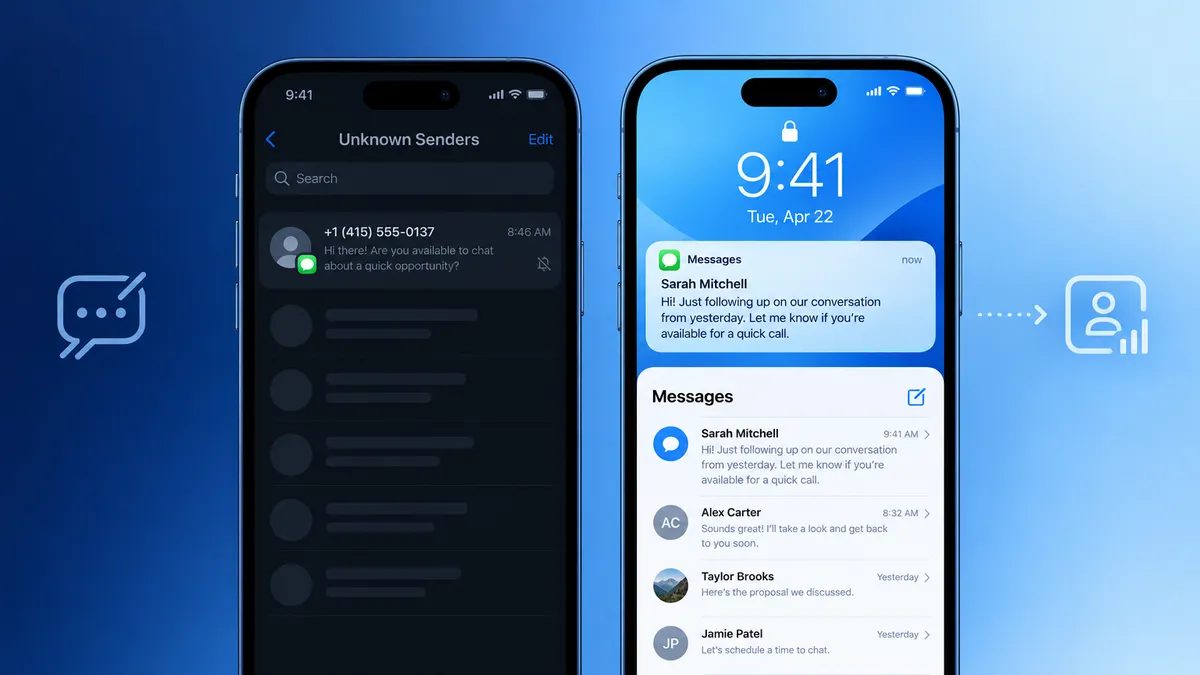
If your CRM is still sending standard SMS texts to follow up with leads, iOS 26 just made that problem significantly worse. Apple's latest operating system introduced an enhanced Screen Unknown Senders filter that quietly routes business texts into a hidden folder with no lock-screen notification, no sound, and no preview. Your lead never knows it arrived.
The good news: blue-bubble-style messaging through a CRM-connected iMessage platform bypasses this filter entirely. Here is what is happening, why it matters for your pipeline, and what your team should do differently starting today.
What Is iOS 26 Screen Unknown Senders?
Apple has long offered a basic Filter Unknown Senders toggle in the Messages app. With iOS 26, that feature got a significant upgrade and it is having real consequences for business texting.
When Screen Unknown Senders is enabled, any SMS or MMS from a number not saved in the recipient's contacts is automatically sorted into a separate Unknown Senders folder. These messages do not trigger a lock-screen notification, do not produce an audio or haptic alert, do not appear in the main Messages inbox, and require the user to actively open the hidden folder to find them.
The filter is technically off by default, but industry testing has found that more than 55% of active iPhones already have it enabled. With iOS 26 adoption climbing toward 70% by year-end, the exposure for business SMS is growing fast.
For sales teams using CRM-triggered SMS sequences, this is not a minor deliverability tweak. It is a structural problem: your message may be technically delivered and completely invisible at the same time.
How Bad Is the Impact on Business SMS?
Research from across the messaging industry paints a consistent picture. For messages that land in the Unknown Senders folder, brands have reported click-through rate drops of 30 to 40 percent and conversion rate declines in the same range.
That kind of drag does not show up immediately in your dashboard. Delivery rates look normal because the message was technically received. What you will notice instead is a slow decline in reply rates, slower lead response times, and fewer booked appointments from what used to be reliable SMS sequences.
The businesses most exposed are those running cold or warm lead follow-up via A2P SMS, appointment reminders to new contacts, post-form-submission outreach sequences, and re-engagement campaigns to older leads. In all of these cases, the sender's number is almost certainly not saved in the recipient's phone, which means every message is at risk of being filtered.
Why Blue-Bubble Texting Is a Different Conversation
Here is the critical distinction that most SMS-focused advice is missing: iOS 26's Unknown Senders filter only applies to carrier SMS, MMS, and RCS. It does not apply to iMessage.
When a message arrives via iMessage, the blue-bubble format iPhone users know from personal conversations, it bypasses the carrier-level filtering system entirely. It arrives in the main Messages inbox. It triggers notifications. It looks and feels like a text from a friend or colleague, not a business blast from an unknown number.
This is the core value of blue-bubble CRM texting. iMessage routes through Apple's own encrypted servers, not through mobile carrier networks. That means it sidesteps both the iOS 26 Unknown Senders filter and the carrier-level A2P spam filters that are increasingly aggressive against business phone numbers, especially in real estate, insurance, and home services.
The performance difference is measurable. Vendor-reported benchmarks from 2026 consistently show reply rates of 25 to 45 percent for warm blue-bubble outreach, compared to 5 to 15 percent for comparable A2P SMS outreach. Results vary based on audience quality, message content, timing, and consent context, but the directional gap is consistent across the market.
The Green Bubble Problem Is Bigger Than You Think
Even before iOS 26, the green bubble carried psychological baggage in the iPhone ecosystem. iPhone users intuitively associate blue bubbles with personal, human conversations and green bubbles with systems, marketing blasts, and noise. Research has consistently shown that iPhone users are more likely to ignore, delay, or skip green-bubble messages from unfamiliar numbers.
iOS 26 has formalized that psychological bias into a structural inbox filter. The green bubble is now not just a signal of lower trust. It is a literal ticket to the hidden folder. With iOS accounting for roughly 58 percent of U.S. smartphone traffic, this is not a niche concern. For most sales teams, the majority of their lead list is on an iPhone.
What CRM Teams Should Do Right Now
If your team is running lead follow-up sequences through a standard CRM SMS channel, here is a practical action plan.
1. Audit Your Current Reply Rates
Pull reply rate data from your last 60 to 90 days of CRM SMS sequences. If you are seeing rates below 10 percent on warm leads, the iOS 26 filter may already be a contributing factor. Delivery rates alone will not tell you. Look at replies and click-throughs.
2. Identify Your Highest-Value Follow-Up Sequences
Not every sequence needs to change immediately. Start with the sequences that generate the most pipeline: speed-to-lead follow-ups, appointment confirmation messages, and post-demo re-engagement. These are the highest-value touchpoints to protect first.
3. Layer In a Blue-Bubble Texting Channel Through Your CRM
Blue-bubble CRM texting does not replace your existing workflows. It upgrades the channel those workflows run on. Leadengage Blue connects to your CRM so your existing automation logic, contact data, and follow-up sequences continue to work exactly as configured, but the messages arrive as iMessages instead of carrier SMS. Same workflows. Dramatically better inbox placement.
4. Prioritize iPhone Contacts for Blue-Bubble Delivery
Most blue-bubble platforms can detect whether a contact's number is iMessage-capable before sending. Use that capability to route iPhone contacts through the iMessage channel and Android contacts through SMS or RCS, ensuring every lead gets reached on the best available channel for their device.
5. Stop Relying on Delivery Rates as Your Primary Health Metric
In the post-iOS 26 environment, a message being delivered tells you very little. Track reply rate, response time, and conversation rate as your primary indicators of messaging channel health.
What About Encouraging Leads to Save Your Number?
The standard SMS-focused advice for surviving the iOS 26 filter is to get contacts to save your number or mark it as Known. That is technically sound, but it also asks your lead to do extra work before they have had any reason to trust you.
Blue-bubble texting sidesteps this friction entirely. Because iMessage does not go through the carrier layer, it does not trigger the Unknown Senders filter in the first place. Your first message arrives in the main inbox like any other personal text, without requiring the lead to take any action on your behalf first. For high-volume outreach teams, this is a meaningful operational difference. The blue-bubble channel earns inbox placement by design, not by asking for a favor.
The Bottom Line
iOS 26 did not break SMS entirely. But it added a meaningful new layer of friction to business texting on the world's most popular smartphone, and that friction lands hardest on the sales teams and CRM sequences that depend on fast, high-response outreach to unfamiliar numbers.
Blue-bubble CRM texting, messages that arrive as iMessages in the main inbox with full notifications, read receipts, and the trust signal of a personal conversation, is the most direct response to that friction available right now. If your team's pipeline depends on lead follow-up speed and reply rate, this is the channel upgrade worth evaluating first.
Want to see how Leadengage Blue connects to your CRM to deliver blue-bubble follow-up? Book a quick demo and we will show you exactly how it maps to your existing workflows.
Frequently Asked Questions
Does iOS 26 block iMessages?
No. The Screen Unknown Senders filter applies to SMS, MMS, and RCS messages from numbers not in the recipient's contacts. iMessages route through Apple's servers, not carrier networks, so they are not subject to this filter.
Is the Screen Unknown Senders filter turned on by default?
The setting is technically off by default, but industry testing indicates more than 55 percent of active iPhones already have it enabled, and adoption is expected to grow as more users update to iOS 26.
What is blue-bubble CRM texting?
Blue-bubble CRM texting means sending messages from your CRM through Apple's iMessage network rather than standard carrier SMS. Recipients on iPhones see these as blue bubbles, the same format as personal texts, arriving in their main inbox with full notifications.
Do I need A2P 10DLC registration for iMessage outreach?
No. A2P 10DLC registration governs messages sent through U.S. carrier networks. iMessage routes through Apple's infrastructure and is not subject to carrier-level A2P requirements. TCPA consent rules still apply to any outreach program.
What reply rates can I expect from blue-bubble CRM texting?
Vendor-reported benchmarks from 2026 range from 25 to 45 percent reply rates for warm outreach, compared to 5 to 15 percent for A2P SMS. Results vary based on audience quality, message content, timing, and consent context. Treat these as directional benchmarks, not guarantees.
Can blue-bubble texting work with my existing CRM workflows?
Yes. Leadengage Blue connects to your CRM and upgrades the delivery channel for your existing automation sequences. Your workflow logic, timing, and contact data stay the same, and the messages arrive as iMessages instead of green-bubble SMS.
What happens when a lead is on Android?
Most blue-bubble platforms, including Leadengage Blue, detect iMessage availability before sending and automatically fall back to RCS or SMS for non-Apple recipients, ensuring every lead gets reached on the best available channel for their device.