Leadengage Blog

Insights, Tips, and Updates on Text Automation and Follow Up Boss Integration

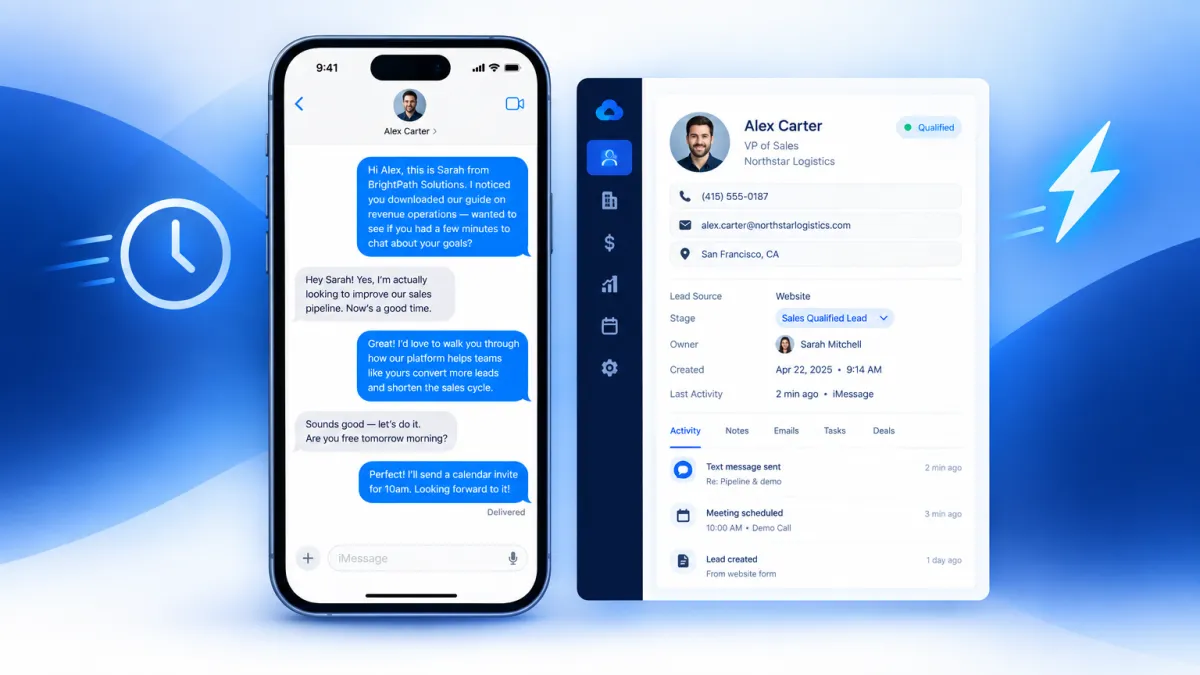
Blue bubble iMessage conversation on a smartphone next to a CRM lead record dashboard, representing faster lead response through blue-bubble CRM texting

Why Your CRM's Built-In Texting Is Losing You Leads (And What Blue-Bubble Messaging Does Instead)

September 30, 2026

Quick answer: The texting built into most CRMs sends standard SMS — green-bubble, carrier-routed messages that are subject to spam filtering, A2P registration friction, and the immediate visual signal that a system is reaching out, not a person. Blue-bubble messaging routes through Apple's iMessage network instead, arriving in your lead's native Messages app looking exactly like a text from a friend. Vendor-reported reply rates for blue-bubble outreach on warm leads range from 25 to 45 percent, compared to 5 to 15 percent for standard business SMS. If your CRM texting is underperforming, the channel — not the message — is likely the problem.


The Texting Tool You Already Have May Be Working Against You

If you use a CRM with built-in texting, you've probably noticed something frustrating: you send follow-up messages, and most of them go nowhere. Low reply rates. Leads going cold. Sequences that look good in the workflow builder but produce almost nothing in the real world.

The typical explanation is that the message isn't compelling enough, or the timing is off, or you're following up too many times — or not enough. So teams tweak the copy, adjust the delays, and run the experiment again. Results stay flat.

Here's what most teams miss: the problem often isn't the message. It's the channel delivering it.

Standard CRM texting sends SMS — green-bubble messages routed through U.S. carrier networks. From the moment a lead sees that green bubble from an unknown number, they've already categorized it as a business outreach, not a personal text. That mental categorization happens before they read a single word. And in 2026, most people's default behavior with green-bubble messages from unknown numbers is to ignore them, especially in a crowded follow-up environment.

Blue-bubble messaging changes the first impression entirely — and first impressions in texting happen in about half a second.


What Makes Blue Bubbles Different (Beyond the Color)

Blue bubbles aren't just an aesthetic preference. They signal something specific to every iPhone user: this message came through iMessage, Apple's peer-to-peer messaging network — the same network they use to text friends and family.

That signal matters because of what it isn't. It isn't a short code. It isn't a toll-free number. It isn't a 10-digit A2P business line registered with the carriers as an application-to-person sender. It's a real phone number, delivered through the personal messaging layer that iPhone users trust by default.

The practical differences stack up quickly:

  • Carrier spam filters don't touch iMessage. SMS sent through business platforms is subject to carrier-level A2P filtering, and even registered 10DLC campaigns see a meaningful percentage of messages silently dropped before delivery. iMessage routes through Apple's infrastructure, bypassing that filtering layer entirely.
  • Read receipts tell you what happened. With SMS, you send into a void. With iMessage, you know when the message was delivered and when it was read — giving your team real signal to work with instead of guessing.
  • Typing indicators create a conversation feel. When a lead starts composing a reply, you see it. That alone changes how reps engage with the thread.
  • Rich media lands natively. Photos, PDFs, short videos, and voice memos deliver at full quality through iMessage — no compression, no MMS limitations, no broken links.
  • The visual context is personal, not commercial. A blue bubble from a real 10-digit number sits in the same visual space as texts from the lead's friends. A green bubble from an unrecognized sender sits in the same visual space as every other automated business text they've learned to ignore.

Research published by the National Bureau of Economic Research (NBER Paper 33642, April 2025) found that iPhone users actively stigmatize green bubbles and demonstrate a measurable preference for avoiding them. That preference extends to how they perceive inbound messages: green reads as a system, blue reads as a person.


The Speed-to-Lead Problem Blue Bubbles Help Solve

Response speed is one of the most studied variables in lead conversion. The pattern is consistent across research: leads contacted within the first five minutes of submitting an inquiry convert at dramatically higher rates than leads contacted later. The industry average manual follow-up time, however, sits at more than 29 hours.

CRM automation addresses the timing problem — workflows can fire a follow-up the moment a lead fills out a form, changes a pipeline stage, or misses an appointment. But automation only solves the timing half of the equation. The other half is whether the message actually arrives, gets noticed, and earns a reply.

A blue-bubble message fired automatically from a CRM trigger — a new form fill, a no-show, a demo request — can reach a lead's lock screen in seconds, looking like a text from a real person. That combination of speed and personal presentation is what makes the channel valuable for CRM-connected follow-up, not just outbound prospecting.

Vendor-reported benchmarks across the market in 2026 put iMessage reply rates on warm outreach at 25 to 45 percent, compared to 5 to 15 percent for A2P SMS on equivalent content. Results vary based on audience quality, message copy, timing, and consent context — use those numbers as directional benchmarks, not guarantees. But even directionally, the gap is significant enough to change pipeline math for most teams.


Why Most CRM Texting Tools Can't Send Blue Bubbles

This is a point worth understanding clearly, because it's not obvious from the outside.

The texting feature built into most CRMs — including the one your team may already be using — routes messages through standard U.S. carrier SMS infrastructure. That means every message is sent as an A2P (application-to-person) message, which produces a green bubble on the recipient's iPhone by definition. There is no configuration option, no upgrade tier, and no workaround that makes a carrier SMS line send blue bubbles. The two messaging networks are architecturally separate.

Blue-bubble messaging requires sending through Apple's iMessage network from a number registered to iMessage — which is a fundamentally different infrastructure than the SMS pipelines that CRM texting features are built on. That's why blue-bubble business texting is a separate layer added on top of your CRM, not a feature toggle inside it.

Leadengage Blue connects to your existing CRM workflows and replaces the SMS channel with iMessage-routed messaging — so the automations, contact records, and pipeline triggers your team has already built continue to work exactly the same way, but the messages now arrive as blue bubbles instead of green.


Which Teams See the Biggest Difference

Blue-bubble messaging through a CRM delivers the most noticeable results in situations where reply speed and personal feel both matter:

  • Real estate teams following up on new buyer and seller inquiries, where the first agent to get a response often wins the relationship.
  • Home service businesses confirming estimates, following up on unsold quotes, and reducing no-shows on scheduled appointments.
  • Agencies running lead generation campaigns who need to maximize contact rates on the leads they're handing to clients.
  • Insurance and financial services teams following up on inbound quote requests, where warm leads go cold quickly.
  • SaaS sales teams working inbound demo requests and free trial sign-ups where speed-to-response correlates directly with activation and closed-won rates.

In each of these cases, the existing CRM workflow is already sound. The follow-up is timed correctly. The message copy is reasonable. The only variable that changes when blue-bubble messaging is added is the channel — and that single variable consistently moves reply rates in the right direction.


What Leadengage Blue Adds to Your Existing CRM

Leadengage Blue is built specifically for teams that already have a CRM and already have follow-up workflows in place. The goal isn't to replace your stack — it's to upgrade the channel those workflows run on.

When a lead is created, a stage changes, or an automation trigger fires, Leadengage Blue routes that message through iMessage instead of carrier SMS. Replies come back into your CRM as logged conversation records. Your team works the same way they always have — the difference is that the messages arriving in leads' inboxes look and feel like personal texts, not business broadcasts.

The result is more replies, faster responses, and more conversations that actually go somewhere — without rebuilding your workflows or retraining your team.

If your CRM texting isn't delivering the reply rates your pipeline needs, the fix probably isn't another sequence tweak. It's switching the channel your sequences run on.


Frequently Asked Questions

What is blue-bubble messaging for business?

Blue-bubble messaging means sending business texts through Apple's iMessage network rather than standard carrier SMS. Recipients on iPhones see them as blue bubbles — the same format as personal texts from friends — rather than the green bubbles produced by all standard business SMS platforms. The blue color is a trust signal that recipients process before reading the message content.

Why does my CRM's built-in texting only send green bubbles?

CRM texting features route messages through U.S. carrier SMS infrastructure as A2P (application-to-person) traffic. All A2P SMS produces green bubbles on iPhones regardless of the platform sending it. Sending blue bubbles requires routing through Apple's iMessage network, which is architecturally separate from carrier SMS and not available through standard CRM texting tools.

Do I need to register for A2P 10DLC to use iMessage for business?

No. A2P 10DLC registration applies to messages sent through U.S. carrier networks. iMessage routes through Apple's infrastructure and is not subject to carrier-level A2P registration requirements. TCPA consent rules still apply, including the requirement for valid consent and honored opt-outs.

What reply rates can I expect from blue-bubble CRM follow-up?

Vendor-reported benchmarks across the industry in 2026 show 25 to 45 percent reply rates on warm iMessage outreach, compared to 5 to 15 percent for equivalent A2P SMS. Results vary based on audience quality, message content, timing, and consent context. Treat these as directional benchmarks rather than guarantees for any specific campaign.

What percentage of my leads can receive blue-bubble messages?

iOS accounted for approximately 58 percent of U.S. mobile traffic in mid-2026, meaning the majority of your contacts are likely on iPhone-capable devices. For leads who are not on iMessage, Leadengage Blue falls back to SMS to ensure every message is delivered.

Will my existing CRM workflows still work with Leadengage Blue?

Yes. Leadengage Blue is designed to connect with your existing CRM and replace the SMS channel in your current workflows without requiring you to rebuild your automations. Triggers, sequences, and pipeline logic remain the same — only the outbound message channel changes.

Is blue-bubble messaging only useful for outbound prospecting?

No. Blue-bubble messaging through a CRM is valuable at multiple stages of the pipeline: speed-to-lead follow-up, appointment confirmations, no-show recovery, reactivation of dormant leads, and post-close onboarding. Anywhere your current SMS follow-up is producing low engagement is a candidate for a channel upgrade.

How does Leadengage Blue differ from adding an iMessage API to my stack?

iMessage API providers are generally built for developers who want to write code and manage integrations manually. Leadengage Blue is purpose-built for sales teams and CRM users who want blue-bubble follow-up to work inside their existing workflows without building a custom integration from scratch.


Ready to see what your CRM follow-up looks like when leads actually reply? Book a demo with Leadengage Blue and run your first blue-bubble sequence on real leads from your pipeline.


blue bubble textingCRM textingiMessage for businesslead responsesales follow-upSMS vs iMessageLeadengage Blue
Back to Blog

Pricing

Affordable Plans, Starting At Just $149

Get powerful tools and seamless integration for as low as $149. Choose the plan that helps your business grow.

Leadengage FAQ

Frequently Asked Questions

Everything you need to know about Leadengage

Getting Started

Leadengage is an AI-powered marketing and communication platform built specifically for real estate agents, teams, and brokerages. It supercharges Follow Up Boss with automated drip texting, Voice AI, social media message integration, broadcast campaigns, review automation, and dozens of other tools — all designed to help you convert more leads and close more deals from the database you already have.

Trusted by 500+ FUB teams across the U.S. and Canada.

Most of Leadengage's core features — including drip texting through FUB Automations, the FUB Embedded App, and social message integration — are built around Follow Up Boss. However, if you're not currently using FUB, our Platform Plan gives you access to a wide range of standalone features including AI automations, website and funnel builder, social media planner, email marketing, and more.

Leadengage is purpose-built for FUB users and delivers the most value when connected to your FUB account.

Getting started is simple! After signing up, you'll connect your Follow Up Boss account, complete a one-time A2P/10DLC number registration (required for SMS compliance), and install the Leadengage Embedded App in FUB. Most agents are up and running within 3 business days after A2P approval.

Visit leadengage.com/onboarding for our full setup guide, or reach out to our team for personalized help. For done-for-you setup and FUB Automation creation, we recommend working with Kee Technology Solutions.

Yes! Leadengage works in both the United States and Canada. Canadian agents and teams can use all core features including drip texting, social message integration, and the FUB Embedded App. Local Canadian phone numbers are used for messaging, and applicable carrier compliance rules apply.

A2P/10DLC registration is not required for Canadian numbers, but is available if you need to text U.S.-based numbers.

Plans & Pricing

Leadengage offers four main plans to fit solo agents, small teams, and large brokerages:

  • Messaging Plan — Automated drip texting and FUB integration for solo agents and small teams. Up to 5 users. Includes a monthly usage credit. 7-day free trial.
  • Automation Plan — Everything in Messaging, plus AI automations, ad manager, social planner, and advanced tools. Up to 15 users. Includes a monthly usage credit. 14-day free trial.
  • All-In-One Platform Plan — Best value for mid to large teams. Replaces multiple tools with one comprehensive platform. Up to 30 users. Includes a monthly usage credit. 14-day free trial.
  • Enterprise — Custom plan for large teams and brokerages with unlimited users and custom usage. Contact us for details.

All plans are available monthly or annually. Annual plans save the equivalent of 2 months. Visit our pricing page for current rates and a full plan comparison.

Conversational AI is available as an add-on on all plans (select the AI Agents plan at checkout alongside your base plan). Leadengage Blue plans with iMessage phone service can be found at leadengageblue.com.

Yes! The Messaging Plan comes with a 7-day free trial, and both the Automation and Platform Plans include a 14-day free trial. No setup required to start.

Please note: any usage charges (SMS, calls, AI, etc.) incurred during your trial are not covered by included wallet credits and will be billed separately. The trial ends early if you'd like our team to submit your A2P/10DLC registration.

Free trials are not available for the Leadengage Blue (iMessage) or AI Agent add-on plans.

Yes — monthly plans have no long-term contracts and can be canceled at any time. Annual plans are billed upfront and provide access for the full year. If you request early cancellation on an annual plan, any refund will be prorated based on the monthly rate for months used.

Note that Leadengage Blue (iMessage integration) requires a 3-month minimum commitment. If you have questions about your plan or cancellation, contact our support team at leadengage.com/contact-us.

No. Leadengage charges one flat subscription fee per Follow Up Boss account — regardless of how many FUB users you have. All users within your FUB account get access to the Leadengage Embedded App and drip texting through FUB Automations at no extra cost. Leadengage platform access and the Call Connect feature are limited to the user count included in your plan (Messaging – 5 users, Automation – 15 users, Platform – 30 users).

The only other variable cost that may apply is if your team's messaging volume exceeds your plan's included monthly wallet credits. Many teams never exceed their included credits. Visit leadengage.com/pricing for credit amounts by plan and leadengage.com/usage for current usage rates.

We recommend limiting full platform access (leads, billing, and communications) to the team owner and admin/operations manager only.

Follow Up Boss Integration

Yes — Leadengage is purpose-built for Follow Up Boss. It includes an Embedded App within the FUB sidebar for quick access to features, enables automated drip texting directly inside your FUB Automations, and routes incoming messages from social media and your website chat widget into your FUB contact records. Most Leadengage features work through FUB notes, which are converted into SMS messages that appear as Inbox App Conversation texts in Follow Up Boss.

Not on Follow Up Boss? The Platform Plan gives you access to a full suite of standalone features.

Leadengage works inside Follow Up Boss by recognizing special command codes placed in your FUB Automation notes. To send a text, add the [SMS] command at the start of a note, followed by your message. For example:

[SMS] Hi %contact_first_name%, this is %agent_first_name% with %company_name%. I just saw you registered on our site — can I help you find what you're looking for? Reply STOP to opt out.

When the automation runs, Leadengage sends the message through your Leadengage number, automatically filling in merge fields and removing the [SMS] tag. Texts are delivered during smart send windows:

  • Daily send window: 9:15 am – 7:45 pm (your local time zone)
  • Messages scheduled outside this window are held and sent the next morning at 9:15 am
  • Texts are also held on holidays or on any days of the week you've set to skip in your FUB Embedded App "User" preferences, and delivered the next business day

You can also schedule texts with timed delays — [15min], [1hr], [2hr] — or at specific times of day such as [9:30am] or [1pm] using additional timing commands. For a full list of commands, visit leadengage.com/help.

Yes! Through our Leadengage Blue product, you can send and receive iMessages directly within Follow Up Boss. This gives your messages a more personal, blue-bubble appearance and can improve engagement by bypassing standard SMS carrier filtering.

iMessage integration is available as an add-on or standalone plan and requires a 3-month minimum commitment. Learn more at leadengageblue.com.

Messaging & Communications

SMS messages are delivered in segments. One standard segment is up to 160 characters of plain text. If your message is longer than 160 characters, it's automatically split into multiple segments — and each segment counts toward your usage credits. A few things to keep in mind:

  • Special characters — like smart quotes, em dashes, or emojis — trigger Unicode encoding, which reduces the per-segment character limit to 70 characters.
  • Most standard conversational text messages fit within one or two segments.
  • Usage credits are deducted per segment sent, not per message.

Tip: Keeping your messages concise and avoiding special characters helps stretch your included monthly credits further.

A2P (Application-to-Person) refers to automated text messages sent from software to mobile devices — which is exactly how Leadengage sends your drip texts and campaigns. 10DLC (10-Digit Long Code) is the carrier registration system required by all major U.S. carriers for A2P messaging.

When you sign up, you'll complete a one-time 10DLC registration to verify your business identity with the carriers. This is not unique to Leadengage — it's an industry-wide requirement for all SMS platforms. Registration improves message deliverability for your business and helps protect consumers from spam.

Our onboarding guide at leadengage.com/onboarding walks you through the full registration process.

Every Leadengage plan includes a monthly Wallet Credit that covers the cost of communications and AI features — including SMS, phone calls, voicemail drops, email, and AI-powered conversations. Credit amounts vary by plan — visit leadengage.com/pricing for a full breakdown.

Credits are deducted as you use features. Higher-tier plans carry lower per-use rates, so your credits go further dollar-for-dollar. Many agents and teams never exceed their included credits. You can monitor your usage balance in your account dashboard and view current rates at leadengage.com/usage.

Important: Usage charges incurred during your free trial period are not covered by wallet credits and will be billed separately.

If your team exceeds your included Wallet Credit, additional usage is billed automatically at standard carrier and AI processing rates. There are no surprise fees, no penalties, and no interruptions to your service — you simply continue as normal and pay only for the additional usage you actually consume.

Platform Plan members enjoy the lowest overage rates. You can review all usage pricing at leadengage.com/usage and monitor your balance anytime in your account dashboard.

Social Messages to Follow Up Boss

Leadengage currently supports one Facebook Business login to connect multiple pages, any Instagram Professional accounts connected to that Facebook page, and one Google login with as many Business Profiles. Messages from Facebook and Instagram appear directly in your FUB contact records, and you can reply using the Leadengage Embedded App or mobile shortcuts. Our auto-tagging feature lets you automatically route incoming social leads to specific team members.

Note: Personal social profiles are not supported.

Social Planner (Automation & Platform Plans)

The Social Planner lets you connect and post to multiple accounts simultaneously. Supported platforms:

  • Facebook Business Pages & Reels
  • Instagram Professional Accounts (Posts, Stories, and Reels)
  • Google My Business (up to 10 locations)
  • LinkedIn Pages and Profiles
  • Pinterest
  • TikTok personal profiles (business accounts coming soon)

You can post immediately or schedule content in advance, and add an initial follow-up comment on Instagram and Facebook posts.

No limit. You can add the Leadengage Chat Widget to as many websites or pages as you like. You can also create and customize multiple chat widgets — each with different branding, messaging, or lead routing — for different sites, pages, or purposes. Conversations that start through the chat widget forms are converted to SMS and routed into Follow Up Boss.

AI & Automation

Not by default — you stay in control of your conversations. Leadengage handles the sending and timing of your drip texts based on your FUB Automations, but when a lead replies, you decide how to respond. You can manage replies directly in Follow Up Boss, use the Leadengage Embedded App, or respond from the mobile app.

However, if you'd like AI to handle initial conversations on your behalf, you can add Conversation AI as an optional add-on. Conversation AI can qualify leads, answer common questions, and book appointments — 24/7 without any manual involvement. Visit our pricing page for add-on details.

Conversation AI is an optional add-on that uses AI to respond to incoming messages on your behalf. When a lead replies to a drip text or reaches out through any of your connected channels, the AI takes over the conversation — qualifying the prospect, answering frequently asked questions, and booking appointments when the lead is ready.

AI usage is billed from your monthly wallet credits at variable rates based on the model selected. Visit leadengage.com/pricing for add-on pricing and leadengage.com/usage for full AI rate details.

Google logo illustrating branding for automated texting solutions in real estate communications.

Hear From Our Clients

Integrating FUB and leadngage has been a game changer for my business. It automates all my outbound texting, and has helped me convert tons of leads!

Eileen H

Keller Williams

Before adding Leadngage to Follow Up Boss, we were missing inbound conversations and opportunities from our website, social media, and text inquiries because we were juggling multiple apps. Now, everything is managed seamlessly within Follow Up Boss, all in one place.

Jeremy S

EXP

Our team is thrilled with Leadngage. We've saved money by no longer needing VAs to copy and paste text templates to new leads—everything is automated now.

Brian G

Remax

Leadengage logo featuring green and blue text with a speech bubble, representing automated texting solutions for real estate professionals.

CONNECT

[email protected]

770-746-7716

470-668-7330

1200 Commerce Dr

Suite 603
Peachtree City, GA 30269

Have Questions?

Need Help?

©2026 – Leadengage | All Rights Reserved