How Real Estate Agents Use a Deal Pipeline to Track Every Buyer and Seller Lead (And Never Lose a Deal to the Cracks)
Here's the uncomfortable truth most agents already know: leads don't die because the market is slow. They die because nobody followed up at the right time. A buyer goes quiet after a showing, a seller lead goes cold after one call, and three months later you find out they listed with someone else — someone who just happened to stay in front of them.
A deal pipeline fixes that. It's a visual, stage-by-stage view of every active buyer and seller lead in your business so you always know who needs attention, what comes next, and which deals are in danger of going cold. When it's connected to your CRM and your automated follow-up, it becomes the command center your entire business runs through.
Here's how agents and teams are using Leadengage pipelines to keep every deal visible and every follow-up on time.
What Is a Real Estate CRM Pipeline (And Why Spreadsheets Don't Cut It)?
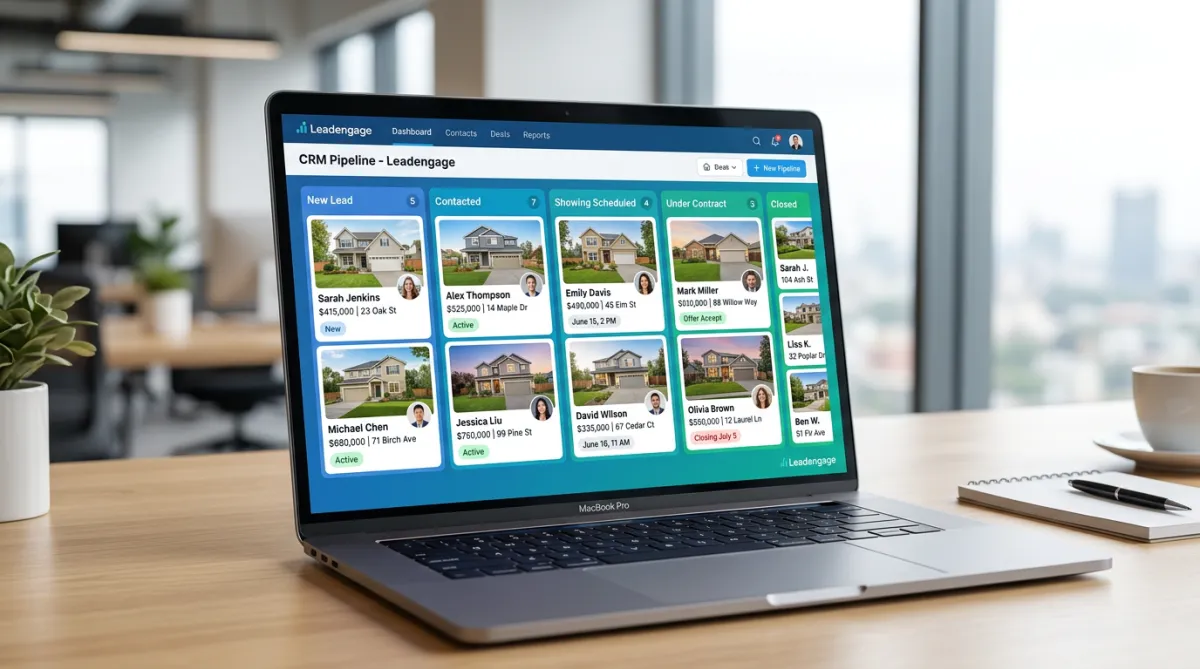
A real estate CRM pipeline is a Kanban-style board where every lead lives in a column that reflects exactly where they are in your sales process. Instead of scrolling through a spreadsheet or relying on memory, you see the full picture in one glance: how many leads are in each stage, which ones have been sitting too long, and what action is needed next.
Spreadsheets require manual updates, don't trigger automation, and give you zero visibility at a glance. A live pipeline inside your CRM is the opposite — it moves with your leads, fires off tasks and texts automatically, and surfaces the deals that need your attention before they slip away.
For a real estate team running 30, 50, or 100+ active leads at any given time, the pipeline isn't optional. It's how nothing gets lost.
A Real Estate Pipeline Stage-by-Stage: What Each Column Should Mean
Every team sets up their pipeline a little differently, but the most effective real estate pipelines follow a logical progression that mirrors how a lead actually moves through your business. A clean setup looks something like this:
1. New Lead
Every new contact lands here — whether they came from a web form, an open house QR code, a Facebook ad, or a text-for-info sign. The moment a lead hits this stage, automation should fire: an immediate text, an intro drip sequence, and a task for an agent to call within the first hour. Speed-to-lead in real estate is everything. Studies consistently show that responding within five minutes makes you 9x more likely to connect than waiting even 30 minutes.
2. Contacted
Once a two-way conversation has happened — even just a reply to a text — the lead moves here. This stage tells your team the lead is aware of you and responsive. The goal now is to qualify: timeline, financing, motivation, area. Automated drip sequences continue running in the background so the lead keeps hearing from you even when your agents are busy.
3. Appointment Set
A buyer consultation, listing appointment, or showing is on the calendar. Reminder texts go out automatically — 24 hours before, two hours before. The no-show rate drops dramatically when follow-up is automated instead of left to someone's memory.
4. Showing / Active Nurture
The lead has toured at least one home or the listing conversation is active. This stage is often where agents lose deals because the follow-up becomes inconsistent. A pipeline view tells you instantly which leads in this stage haven't heard from you in 72 hours — and triggers a task or automated message before the silence gets uncomfortable.
5. Under Contract
The deal is signed. Automated milestone messages go out to keep the client informed and excited — inspection updates, closing countdown texts, moving day checklists. This is also where you plant the seed for your review request, which fires automatically at closing.
6. Closed
The deal is done. A review request goes out. The client moves into a long-term nurture sequence — birthday texts, market update drips, anniversary messages. Your closed clients become your best source of referrals when you stay in front of them automatically.
How Does Leadengage Connect a Pipeline to Automated Follow-Up?
This is where a Leadengage pipeline becomes more powerful than a standalone board. Every stage change can trigger a specific action — a drip sequence, a task assignment, an internal notification, or a direct text message to the lead.
When a lead moves from New Lead to Contacted, the system can automatically pause the initial intro sequence and start a qualification drip. When they move to Appointment Set, reminder texts go out without anyone touching a button. When they close, the review request fires and the long-term nurture sequence kicks in.
Leadengage integrates natively with Follow Up Boss and other leading CRMs, so your pipeline data, contact records, conversation history, and automation all live in the same place. Agents work from the same inbox they already use — they just have a real-time view of every deal layered on top of it.
For ISA teams, the pipeline is especially powerful. ISAs can qualify, move leads through stages, and hand off to buyer or listing agents with full context — no dropped balls, no duplicate outreach, no confusion about who owns what lead.
3 Real Scenarios Where a Pipeline Saves a Deal
Scenario 1: The Stale Buyer Lead
A buyer came in hot three weeks ago, toured two homes, and then went quiet. Without a pipeline, this lead sits in a spreadsheet and nobody notices until the agent happens to scroll past the name. With a pipeline, the lead card turns a warning color after 72 hours of no activity and triggers a task: "Check in — lead has been silent since showing." The agent sends a quick personal text. The buyer was just waiting for a response on financing. The deal is back on.
Scenario 2: The Listing Appointment That Almost Got Away
A seller requested a listing consultation but the appointment confirmation never came through — the email went to spam. A pipeline with automated SMS reminders catches this. The seller gets a text: "Confirming your appointment with Wade on Thursday at 2pm — reply YES to confirm or let us know if you need to reschedule." The seller replies, confirms, and the appointment happens. Without that text, the seller assumed the agent wasn't serious.
Scenario 3: The Database Lead Reactivated at the Right Moment
A lead who went cold eight months ago suddenly shows up as active in the pipeline — they clicked a link in a drip text and filled out a home valuation form. The pipeline flags the re-engagement automatically, bumps them back into an active stage, and assigns a task to call within one hour. The agent calls. The lead lists two weeks later.
What Should You Look for in a Real Estate Pipeline Tool?
Not all pipelines are built the same. A pipeline built specifically for real estate should do the following:
- Trigger automations when a stage changes — not just display information, but actually do something when a lead moves.
- Surface stale leads automatically — flag contacts that haven't moved or been touched in a defined window.
- Sync with your CRM conversations — so agents see the full message history directly on the lead card.
- Support multiple pipelines — buyers, sellers, and referrals often need separate boards with different stage logic.
- Connect to your SMS and email follow-up — so moving a lead to a new stage can immediately kick off the right sequence.
Leadengage checks all of these boxes — and because it's built around Follow Up Boss workflows, agents don't have to learn a new system. The pipeline becomes an extension of how they already work, not a replacement for it.
If you're already using automated calendar booking to fill your schedule with showings and consultations, layering a deal pipeline on top gives you the full picture: leads coming in, appointments setting, deals progressing, and closings happening — all visible in one place.
And once deals are closed, connecting your pipeline to automated review collection means your reputation grows in the background without any manual effort from you or your team.
Frequently Asked Questions
What is a real estate CRM pipeline?
A real estate CRM pipeline is a visual, stage-by-stage board inside your CRM where every buyer and seller lead is tracked from first contact through closing. Each stage represents a step in your sales process, and leads move through stages as they progress. When connected to automation, stage changes can trigger follow-up texts, tasks, drip sequences, and more.
How does a pipeline help real estate agents close more deals?
A pipeline gives agents a real-time view of every active lead so no contact gets forgotten. It surfaces stale leads before they go cold, triggers automated follow-up at each stage, and makes it easy for teams to hand off leads with full context. Agents who use a live pipeline consistently outperform those relying on spreadsheets or memory alone.
Does Leadengage connect a pipeline to automated texting?
Yes. Leadengage pipelines connect directly to drip texting, broadcast campaigns, and Follow Up Boss action plans. When a lead moves from one stage to another, automation can fire automatically — sending a text, starting a new sequence, assigning a task, or flagging the lead for an agent call — all without anyone doing it manually.
Can I run separate pipelines for buyers and sellers?
Yes. Leadengage supports multiple pipelines so you can set up separate boards for buyer leads, seller leads, referral partners, and any other lead type that follows a different progression. Each pipeline can have its own stages, automation triggers, and assigned team members.
How do I get started with a Leadengage pipeline?
Getting started is straightforward. Once your Leadengage account is connected to Follow Up Boss, you can build your pipeline stages, set up stage-change automations, and start routing leads into the board immediately. Most agents have a working pipeline live within the first day. Visit leadengage.com to explore features and get started.
Ready to See Every Deal in One Place?
If you're still tracking leads in your head, a spreadsheet, or sticky notes, you're leaving deals on the table. A Leadengage pipeline gives you the visibility your business needs — and the automation to back it up.
Explore Leadengage and start tracking every buyer and seller deal in a live pipeline →
