How Automated Pipeline Stage Triggers Help Real Estate Agents Follow Up Faster and Close More Deals
How Automated Pipeline Stage Triggers Help Real Estate Agents Follow Up Faster and Close More Deals
You moved a lead into Showing Scheduled. Did your CRM do anything about it? If the answer is no — no text sent, no task created, no confirmation email fired — you just did the hard work of moving the deal forward and got nothing back from your system.
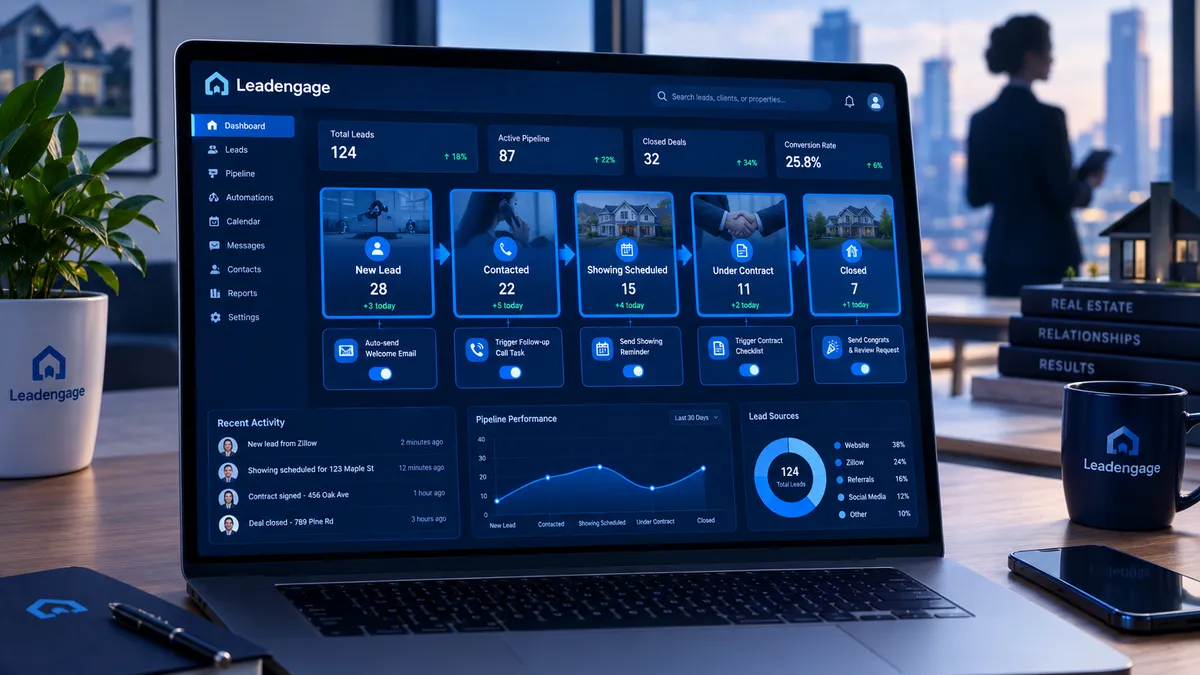
That is the gap between agents who use a pipeline to track deals and agents who use it to drive deals. Leadengage pipeline stage triggers close that gap. The moment a contact moves from one stage to the next, an automated action fires. A text goes out. A task gets created. A follow-up sequence starts. You do not have to think about it, and you definitely do not have to do it manually.
Here is exactly how it works and what it looks like in practice for real estate teams of every size.
What Is a Pipeline Stage Trigger?
A pipeline stage trigger is an automation rule attached to a specific deal stage inside your CRM. When a contact card moves into that stage — whether you drag it manually, an AI agent moves it, or an inbound form populates it — the trigger fires instantly.
The trigger can send a text message to the lead, send an email to the lead or an internal team member, create a follow-up task for the assigned agent, start or stop a drip sequence, update a custom field or tag in the contact record, or fire a webhook to sync data to a connected platform.
The result: your pipeline stops being a passive scoreboard and starts being an active follow-up machine.
Why Does This Matter for Real Estate Specifically?
Real estate deal cycles are long, multi-touch, and full of moments where a timely message makes or breaks the outcome. Most of those moments do not require a custom message — they require a fast one. A showing confirmation. A contract reminder. A check-in text three days before closing. These are not things that need an agent's creative input. They need to happen on time, every time.
When you are juggling 30 active deals, a showing that afternoon, and a listing presentation tonight, you are not going to remember to send every one of those messages. That is not a discipline problem. That is a capacity problem — and automating pipeline stage actions is how you solve it at the system level.
A Real-World Real Estate Pipeline Setup
Stage 1: New Lead
Trigger fires immediately within 60 seconds — a personalized text goes out, a 14-day nurture drip starts in the background, and a task is created for the assigned agent to call within two hours.
Stage 2: Contacted
Trigger fires to stop the initial drip sequence so the lead does not keep getting follow-up texts after you have already spoken. A task is created to schedule a buyer consultation or property tour within 48 hours.
Stage 3: Showing Scheduled
Trigger fires a confirmation text immediately. Twenty-four hours before the showing, a reminder text fires automatically. After the showing, a follow-up text triggers asking for feedback on the property.
Stage 4: Active Offer
Trigger fires an internal notification to the transaction coordinator. An email goes to the client explaining next steps. A task is created to request proof of funds or pre-approval if not already on file.
Stage 5: Under Contract
Trigger fires a congratulations text to the client. An internal task fires to initiate the transaction checklist. A drip sequence starts with contract milestone reminders covering the inspection deadline, appraisal window, and clear-to-close notification.
Stage 6: Closed
Trigger fires a congratulations message to the client. A review request text fires 24 hours later asking for a Google or Zillow review while excitement is still fresh. The contact is tagged as a past client and a long-term nurture sequence starts for referral and repeat business.
How Does This Work With Your Existing Follow Up Boss Setup?
Leadengage integrates natively with Follow Up Boss and other leading CRMs. Your contact data, deal stages, and pipeline activity sync in real time. That means you can build pipeline stage triggers inside Leadengage that respond to stage changes happening in your Follow Up Boss account — without rebuilding your entire workflow or switching platforms.
Agents already running Follow Up Boss pipelines can layer Leadengage automation on top of their existing setup. When a lead moves stages in your Follow Up Boss account, Leadengage sees it and fires the connected action. No manual exports. No double entry. The two systems work together so your automation is always current.
What Real Agents Are Getting Wrong
The most common mistake is building a pipeline with six stages and zero triggers. Agents drag cards from column to column and feel like they are managing their pipeline — but the pipeline is not doing any work. It is just a visual report.
The second most common mistake is building triggers for the early stages but ignoring the late stages like Under Contract and Closed. That is where some of the highest-value touchpoints live. A well-timed congratulations text the day a deal closes, followed by a review request 24 hours later, is one of the highest-ROI automations in real estate — and most agents do it manually or not at all.
What About Leads Who Move Backward?
Real estate does not always go forward. Buyers fall out. Contracts fall through. Leadengage handles this too. You can build stage triggers that fire when a contact is moved back into an earlier stage — a re-engagement text, a soft check-in, or a task to call within 24 hours. The pipeline becomes a complete response system, not just a forward-only tracker.
Setting It Up in Leadengage
Inside Leadengage, pipeline stage triggers are built inside your workflow automation builder. You select the trigger type, choose the specific stage, and then add the actions you want to fire. You can stack multiple actions on a single trigger: a text, a task, and an internal notification all from the same rule. Changes take effect immediately and apply to any contact that hits that stage going forward.
For teams, you can also route the trigger actions to the assigned agent on the deal — so the right person gets the task and the right number sends the message, even when you have 15 agents sharing the same pipeline.
Internal links: How Real Estate Agents Use a Deal Pipeline to Track Every Buyer and Seller Lead | How Real Estate Agents Use Ask AI to Run Their Entire Follow-Up System | How Real Estate Agents Use Automated Calendar Booking
Frequently Asked Questions
Can I attach multiple actions to a single pipeline stage trigger?
Yes. A single stage trigger can send a text, create a task, send an email, and start a drip sequence simultaneously. You build the action stack inside the workflow builder and all of them fire the moment the stage changes.
Does this work if my team is using Follow Up Boss for the pipeline?
Yes. Leadengage integrates natively with Follow Up Boss. Stage changes in your Follow Up Boss pipeline can trigger Leadengage automations, and data syncs in real time between the two platforms.
What happens if I move a contact back to an earlier stage?
You can build separate triggers for backward stage movement. If a contact is moved back to New Lead or Active, you can fire a re-engagement text or create a call task automatically.
Can I set a delay on a stage trigger action?
Yes. Actions do not have to fire instantly. You can set delays — for example, send a review request 24 hours after a contact hits the Closed stage rather than the moment the card is moved.
What is the difference between pipeline stage triggers and regular drip sequences?
A drip sequence runs on a time-based schedule from enrollment. A pipeline stage trigger fires based on a deal event — when a specific thing happens in the pipeline. They complement each other: drip sequences handle ongoing nurture, while stage triggers handle action-specific moments in the deal cycle.
The Bottom Line
A pipeline with no triggers is just a whiteboard. A pipeline with stage triggers is an automated follow-up system that works even when you do not. Every deal stage becomes a moment where your CRM takes action on your behalf — sending the right message, creating the right task, and keeping the deal moving forward without you having to think about it.
If you are already tracking deals in Leadengage or Follow Up Boss, adding pipeline stage triggers is the next layer that turns tracking into closing.
Ready to put your pipeline to work? Start your Leadengage free trial and build your first pipeline stage trigger today.
