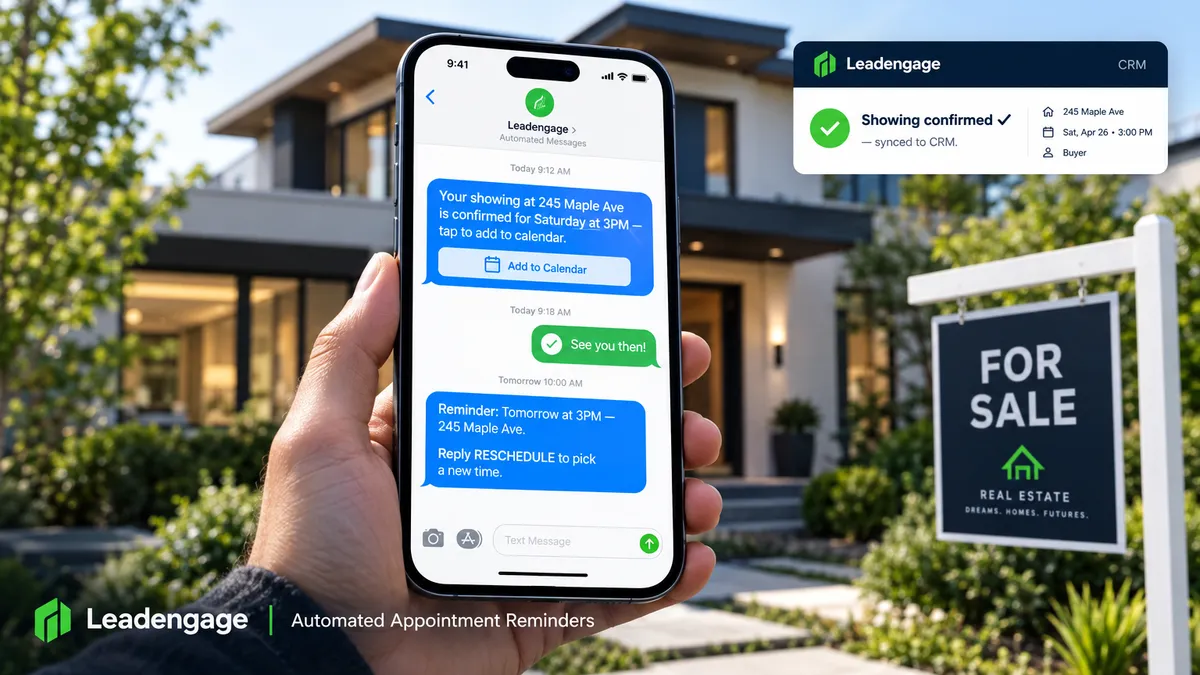
How Real Estate Agents Cut No-Shows With Automated Appointment Reminders
How Real Estate Agents Cut No-Shows With Automated Appointment Reminders
You blocked off three hours on a Saturday. You drove to the property, unlocked the door, turned on the lights -- and nobody showed up. Again.
Showing no-shows are one of the most predictable, preventable problems in real estate, and most agents are still handling reminders the same way: manually, inconsistently, or not at all. The fix is simple. A properly configured automated reminder sequence fires before every appointment without you touching it -- and the leads who are not coming either reschedule or tell you ahead of time instead of ghosting.
Here is exactly how it works inside Leadengage, and why the timing of those reminders matters more than most agents think.
Why Real Estate No-Shows Happen (And Why They Are Preventable)
Most buyers do not ghost you on purpose. Life happens -- they forgot, something came up, they saw another house and assumed you would figure it out. The problem is not motivation, it is friction. Nobody reminded them clearly, nobody made it easy to reschedule, and nobody created accountability in the 48 hours before the showing.
Research on appointment-based businesses consistently shows that a well-timed reminder sequence reduces no-show rates by 50 to 80 percent. For real estate agents running 10 or more showings a week, that is the difference between a full, productive Saturday and a wasted afternoon.
The sequence has to be automated. If it depends on you remembering to send a text the night before, it will not happen consistently enough to matter.
What Does a Real Estate Appointment Reminder Sequence Actually Look Like?
Inside Leadengage, you build the reminder sequence once, attach it to your calendar booking workflow, and it fires automatically every time a new appointment is created. Here is the structure that works:
Step 1: Instant Confirmation (Fires Immediately After Booking)
The moment a buyer books a showing through your calendar link -- or an agent books one manually -- a confirmation text goes out automatically. It confirms the address, the date, the time, and gives the lead a direct reply path such as: Reply YES to confirm or RESCHEDULE to pick a new time.
This first message does two things: it sets expectations and creates the habit of responding. If someone does not reply to the confirmation, you already know the showing is at risk before you have driven anywhere.
Step 2: 24-Hour Reminder
The day before the showing, an automated text fires with a soft but direct message. It restates the property address and time, includes a link to add it to their calendar, and again gives them a low-friction path to reschedule if something changed. People who were on the fence get nudged to either commit or bow out -- either outcome is better than a no-show.
Step 3: 2-Hour Day-Of Reminder
Two hours before the showing, a short final reminder fires. Brief and specific: address, time, agent contact. This is the message that catches the person who forgot it was today. It is also the one that generates the most last-minute reschedule requests -- which is exactly what you want, because 90 minutes of notice is useful. A no-show is not.
Optional: Post-Showing Follow-Up
Leadengage can also fire an automatic follow-up text 30 to 60 minutes after the scheduled end of the showing, asking what they thought and whether they would like to see anything else. This pulls double duty as a nurture touchpoint and a natural conversation opener.
How Does This Connect to Your CRM?
Every action in the reminder sequence -- the confirmation, the replies, the reschedule requests -- logs automatically to the contact record in your CRM. Leadengage integrates natively with Follow Up Boss and other leading CRMs, so your pipeline stays current without any manual data entry.
If a buyer replies RESCHEDULE, the workflow can automatically send them a new calendar link, update their stage in the pipeline, and notify the agent -- all without anyone touching the system. Your calendar availability stays in sync so you are never double-booked when a lead self-reschedules.
For teams running multiple agents, this is especially valuable. The reminder goes out with the correct agent name, the correct property address, and the correct calendar link -- dynamically populated from the booking record -- even when fifty showings are running across the week.
Is Automated Appointment Reminder Texting Legal for Real Estate Agents?
Yes -- with the right setup. Reminder texts sent to people who have already opted in and made an appointment with you fall under transactional messaging, which carries different compliance requirements than cold marketing outreach. The key is that the lead opted in to receive communications when they submitted their information or booked the appointment.
Leadengage is built with TCPA compliance frameworks in mind. Every message in a reminder sequence should clearly identify the sender, include the property or appointment details that make it transactional, and provide a way for the recipient to opt out of future messages if they choose. When your booking workflow captures consent at the point of scheduling, the reminder sequence operates cleanly within those guardrails.
Reminder Sequences for Every Appointment Type, Not Just Showings
The same workflow logic applies across every calendar type in your business:
- Buyer consultation appointments: A 24-hour reminder that re-shares the meeting link or office address and sets expectations reduces cold-feet no-shows on first meetings.
- Listing appointments: Seller leads who booked a free home valuation three days ago sometimes forget -- or talk themselves out of it. A reminder the morning of keeps them committed.
- Open house RSVPs: When a lead RSVPs through a landing page or form, a reminder the evening before and the morning of dramatically lifts actual attendance.
- Closing preparation calls: A reminder sequence for title or closing prep calls keeps the transaction timeline on track and reduces last-minute delays from unprepared clients.
You build each workflow once and it runs on autopilot from that point forward.
What Happens When Someone Actually Reschedules?
This is where a lot of agents leave gaps. The reminder fires, the lead replies they need a new time, and then what? If the answer is manually texting them a link, that is a bottleneck waiting to break.
Inside Leadengage, you build the reschedule path directly into the workflow. When a lead replies with the reschedule keyword -- or with any response that Conversation AI interprets as a reschedule request -- the workflow automatically sends a fresh booking link, cancels or flags the original appointment, updates the CRM stage, and notifies the assigned agent. The whole thing runs without anyone touching it.
Setting Up Appointment Reminders in Leadengage: The Basics
You do not need a complex build to get this running. The core setup involves three components:
- A Leadengage calendar: Your booking page connected to your availability and linked to your CRM contact records.
- A trigger: When a new appointment is created on that calendar, the workflow fires.
- A message sequence: The instant confirmation, 24-hour reminder, and 2-hour reminder -- each with merge fields pulling in the contact name, property address, and appointment time automatically.
From there you can layer in conditional branches: if the lead confirmed, suppress the 2-hour reminder. If they did not reply to the 24-hour message, escalate with a call task assigned to the agent. The base sequence is simple; the logic you add around it is what separates a good reminder system from a great one.
Already running Leadengage calendars? Check out our guides on automated calendar booking for real estate agents and round-robin booking for real estate teams to round out your calendar automation stack.
FAQ: Real Estate Appointment Reminders and No-Show Automation
How far in advance should I send a showing reminder?
The most effective sequences use three touchpoints: an instant confirmation at booking, a 24-hour reminder, and a 2-hour same-day reminder. The 24-hour message is the most critical -- it is early enough to allow genuine rescheduling and late enough to feel relevant.
Can Leadengage send reminders automatically without me doing anything?
Yes. Once the reminder workflow is built and connected to your calendar trigger, it fires automatically every time a new appointment is created -- for every agent on your team, across every property, without any manual action required.
What if a buyer does not respond to any of the reminders?
You can configure the workflow to assign a manual call task to the agent if there is no reply by a set deadline before the showing. This gives you a clean escalation path -- only the silent ones get flagged, not every appointment.
Do reminder texts work for listing appointments and buyer consultations too?
Absolutely. The same workflow logic applies to any calendar type inside Leadengage -- buyer consults, listing appointments, open house RSVPs, and follow-up calls. You build a separate reminder sequence for each appointment type, and each one fires on its own trigger.
Is there a limit to how many reminders I can send before it becomes annoying?
Three touchpoints is the sweet spot for most showing workflows. More than that risks feeling pushy; fewer risks the lead simply forgetting. For higher-stakes appointments like listing presentations, a fourth message -- a brief excitement-builder the morning of -- can work without crossing into spam territory.
Ready to Stop Driving to Empty Houses?
Automated appointment reminders are one of the highest-ROI things you can build in Leadengage. The setup takes under an hour, it runs forever, and every no-show it prevents is time you get back.
Start Your Free Trial at Leadengage.com
Already a Leadengage user? Log in and open your Calendars section to set up your first automated reminder workflow today.
