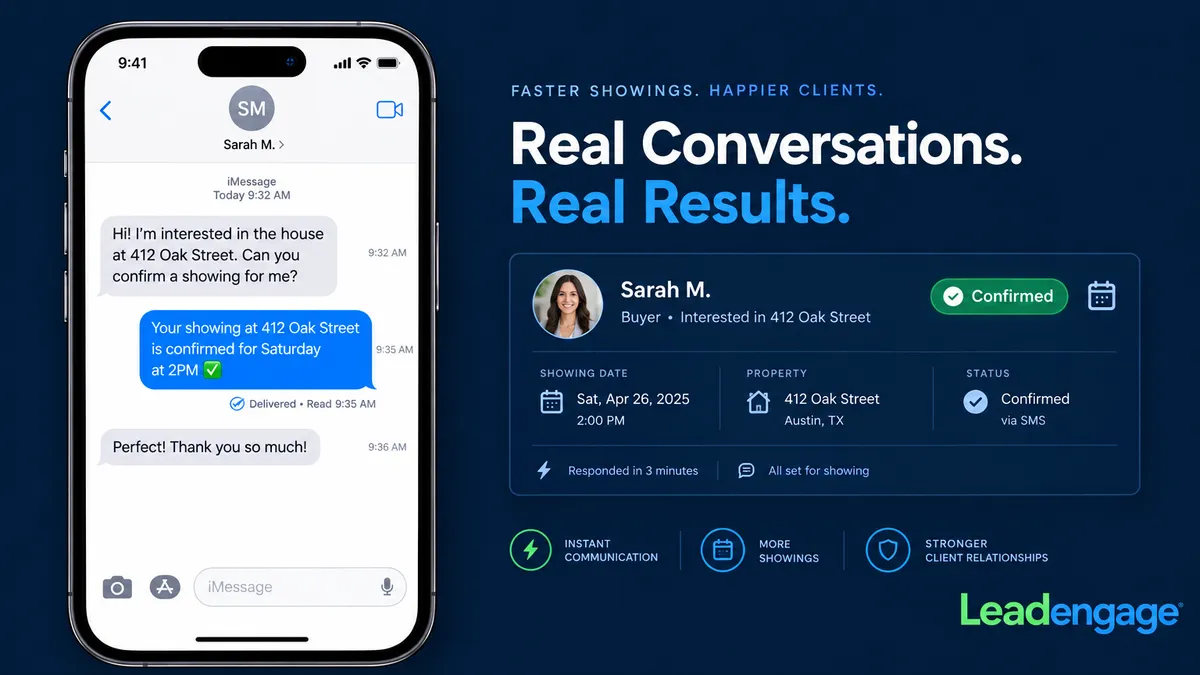
How Real Estate Agents Use iMessage Showing Confirmations to Eliminate No-Shows and Get Instant Read Receipts
You scheduled the showing. You sent the confirmation text. And then your buyer didn't show up — and when you followed up, they said they never got it.
That story plays out dozens of times every week across real estate teams everywhere. And nine times out of ten, the root cause is the same: the confirmation was sent as a standard green-bubble SMS, quietly routed into a filtered folder your buyer never checked, with no way for you to know whether they read it or not.
Leadengage Blue sends showing confirmations as blue-bubble iMessages — the same thread your buyer already uses to text friends and family — and logs a live read receipt back to your CRM the moment they open it. No more guessing. No more no-shows from unanswered texts. No more "I never got it."
Why Showing Confirmations Fail When Sent as Standard SMS
Standard business SMS has a trust problem in 2026. With iOS filtering unknown senders into a secondary inbox, carrier filtering catching anything that looks like automated messaging, and general SMS fatigue across most demographics, a showing confirmation sent from your CRM's default texting channel has a real chance of never being seen at all.
But the bigger issue isn't just delivery — it's visibility on your end. With green-bubble SMS, you never know:
- Whether the message was delivered to the device
- Whether the buyer opened and read it
- Whether they actually saw the address, time, and access instructions
You're flying blind. You block out your afternoon, drive to the property, and wait — because you had no signal that your buyer never actually read the confirmation you sent three hours ago.
What Happens When You Send a Showing Confirmation Through Leadengage Blue?
Leadengage Blue delivers your showing confirmations as native iMessages for iPhone users. That means they land in your buyer's primary Messages app — the same app they're already using — as a blue bubble with no carrier filtering and no secondary inbox routing.
Here's what the workflow looks like in practice:
Step 1: Showing Is Booked
A buyer books a showing — whether through your calendar link, a text reply, or an agent manually creating the appointment in your CRM.
Step 2: Confirmation Fires Automatically as an iMessage
Leadengage Blue triggers the confirmation immediately, sending it as a blue-bubble iMessage to the buyer's iPhone. The message includes the property address, date, time, access instructions, and a simple reply prompt like "Reply YES to confirm."
Step 3: You Get a Live Read Receipt
The moment your buyer opens the confirmation, a read receipt is logged — and that event syncs back to your CRM contact record automatically. You can see, from your dashboard, exactly which buyers have read their confirmations and which haven't responded.
Step 4: Unread Confirmations Trigger a Follow-Up
If a buyer hasn't opened their confirmation within a set window — say, two hours before the showing — a follow-up message fires automatically. This is where you recover no-shows before they happen, not after you've already driven to the property.
Is This Only for iPhone Users?
No. Leadengage Blue includes automatic fallback messaging for leads who aren't on iPhone. If your buyer has an Android device, the confirmation is automatically delivered as a standard SMS so they still receive it. The fallback happens silently in the background — you don't have to manage it manually.
For the large percentage of your buyer database who are on iPhone, the experience is blue-bubble from the start. For Android users, it falls back gracefully.
Who Benefits Most From This Workflow?
Buyer Agents Running Multiple Showings Per Week
If you're running five, ten, or fifteen showings a week, a single no-show costs you real money — not just the time at the property, but the drive, the rescheduling friction, and the lead re-engagement effort. Read receipts let you intervene before the no-show happens.
Open House Hosts Confirming RSVPs
Sending open house reminder texts the morning of the event as iMessages means they hit the primary inbox of every iPhone user on your list. A blue-bubble open house reminder with a read receipt outperforms a green-bubble blast that gets filtered before it's ever seen.
Teams With ISAs Booking on Agent Behalf
When an ISA books a showing and sends a confirmation, the agent needs to know whether the buyer is actually confirmed. Read receipts logged to the shared CRM contact record give the listing agent and the buyer's agent visibility into confirmation status without any extra communication between team members.
Listing Agents Confirming Showing Appointments on Their Properties
When buyer's agents book showings on your listings, you can send automatic courtesy confirmations to the buyer's agent via iMessage — keeping communication in the primary thread, not lost in SMS.
What Does a Read Receipt Actually Tell You?
A read receipt in this context means the iMessage was delivered to the device and opened by the recipient. It doesn't guarantee they memorized the address — but it does give you three critical pieces of data:
- Delivery confirmed. The message got through. There's no carrier filtering issue, no iOS secondary folder, no delivery failure.
- Buyer engaged. They opened the thread. That's a meaningful signal — much stronger than delivery alone.
- Timestamp logged. You know exactly when they read it. If they opened the confirmation at 6 PM the night before a 10 AM showing, you can reasonably assume they're coming. If they haven't opened it by 8:30 AM, you send a follow-up immediately.
That third point is where the operational value really shows up. You're not reacting to a no-show — you're preventing one.
How Leadengage Blue Integrates With Your CRM
Leadengage Blue integrates natively with Follow Up Boss and other leading CRMs. Read receipts, message history, and contact engagement data all flow back into your CRM contact record automatically. Your agents don't need a separate app to see confirmation status — it's all in the same contact view they're already working from.
This also means your automations can respond to read receipt data. An unopened confirmation can trigger a follow-up workflow. A confirmed buyer can be automatically tagged and moved to a different pipeline stage. The data doesn't just sit in a log — it drives action.
Frequently Asked Questions
Does Leadengage Blue work for Android buyers?
Yes. Leadengage Blue automatically falls back to standard SMS for buyers who don't have iPhone. Blue-bubble delivery is used for iPhone users, and the fallback is handled seamlessly in the background without any manual steps.
Can I automate the showing confirmation, or does it have to be sent manually?
The entire confirmation workflow can be fully automated inside Leadengage. When a showing appointment is created in your CRM, the confirmation fires automatically — no manual steps required.
Where do read receipts show up?
Read receipts are logged to the contact record in your CRM. Agents and ISAs can see confirmation status directly from the contact view without switching between apps.
What happens if a buyer doesn't confirm?
You can set up an automated follow-up that fires if a confirmation remains unread or unacknowledged within a certain time window before the showing. This gives you a recovery window before the showing time — not after.
Is this the same as standard SMS texting from my CRM?
No. Standard CRM texting sends green-bubble SMS through carrier networks, which are subject to filtering, delivery issues, and zero visibility on whether the recipient opened the message. Leadengage Blue uses iMessage infrastructure for iPhone users, delivering blue-bubble messages with read receipts directly in the buyer's primary Messages app.
Stop sending showing confirmations into a void. If you're running showings without read receipts, you're managing your schedule based on hope rather than data. Leadengage Blue gives you the read confirmation signal that turns "I think they're coming" into "I know they read it."
See how Leadengage Blue works for real estate showing confirmations → leadengageblue.com
