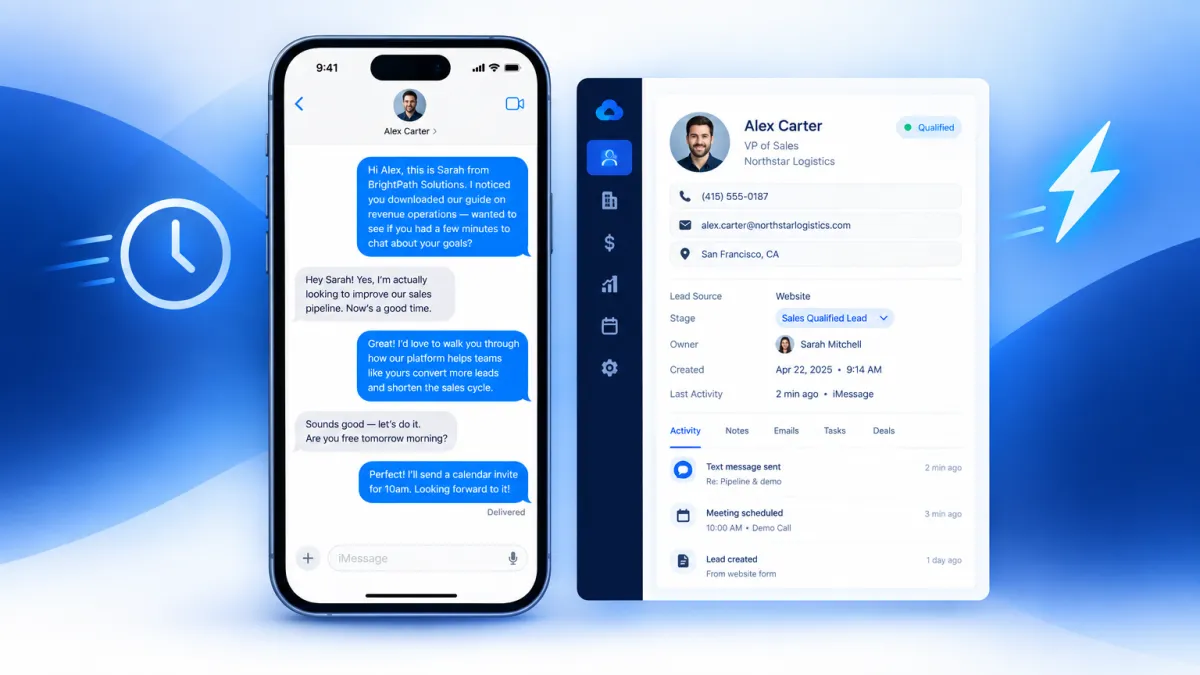
Quick answer: The texting built into most CRMs sends standard SMS — green-bubble, carrier-routed messages that are subject to spam filtering, A2P registration friction, and the immediate visual signal that a system is reaching out, not a person. Blue-bubble messaging routes through Apple's iMessage network instead, arriving in your lead's native Messages app looking exactly like a text from a friend. Vendor-reported reply rates for blue-bubble outreach on warm leads range from 25 to 45 percent, compared to 5 to 15 percent for standard business SMS. If your CRM texting is underperforming, the channel — not the message — is likely the problem.
The Texting Tool You Already Have May Be Working Against You
If you use a CRM with built-in texting, you've probably noticed something frustrating: you send follow-up messages, and most of them go nowhere. Low reply rates. Leads going cold. Sequences that look good in the workflow builder but produce almost nothing in the real world.
The typical explanation is that the message isn't compelling enough, or the timing is off, or you're following up too many times — or not enough. So teams tweak the copy, adjust the delays, and run the experiment again. Results stay flat.
Here's what most teams miss: the problem often isn't the message. It's the channel delivering it.
Standard CRM texting sends SMS — green-bubble messages routed through U.S. carrier networks. From the moment a lead sees that green bubble from an unknown number, they've already categorized it as a business outreach, not a personal text. That mental categorization happens before they read a single word. And in 2026, most people's default behavior with green-bubble messages from unknown numbers is to ignore them, especially in a crowded follow-up environment.
Blue-bubble messaging changes the first impression entirely — and first impressions in texting happen in about half a second.
What Makes Blue Bubbles Different (Beyond the Color)
Blue bubbles aren't just an aesthetic preference. They signal something specific to every iPhone user: this message came through iMessage, Apple's peer-to-peer messaging network — the same network they use to text friends and family.
That signal matters because of what it isn't. It isn't a short code. It isn't a toll-free number. It isn't a 10-digit A2P business line registered with the carriers as an application-to-person sender. It's a real phone number, delivered through the personal messaging layer that iPhone users trust by default.
The practical differences stack up quickly:
- Carrier spam filters don't touch iMessage. SMS sent through business platforms is subject to carrier-level A2P filtering, and even registered 10DLC campaigns see a meaningful percentage of messages silently dropped before delivery. iMessage routes through Apple's infrastructure, bypassing that filtering layer entirely.
- Read receipts tell you what happened. With SMS, you send into a void. With iMessage, you know when the message was delivered and when it was read — giving your team real signal to work with instead of guessing.
- Typing indicators create a conversation feel. When a lead starts composing a reply, you see it. That alone changes how reps engage with the thread.
- Rich media lands natively. Photos, PDFs, short videos, and voice memos deliver at full quality through iMessage — no compression, no MMS limitations, no broken links.
- The visual context is personal, not commercial. A blue bubble from a real 10-digit number sits in the same visual space as texts from the lead's friends. A green bubble from an unrecognized sender sits in the same visual space as every other automated business text they've learned to ignore.
Research published by the National Bureau of Economic Research (NBER Paper 33642, April 2025) found that iPhone users actively stigmatize green bubbles and demonstrate a measurable preference for avoiding them. That preference extends to how they perceive inbound messages: green reads as a system, blue reads as a person.
The Speed-to-Lead Problem Blue Bubbles Help Solve
Response speed is one of the most studied variables in lead conversion. The pattern is consistent across research: leads contacted within the first five minutes of submitting an inquiry convert at dramatically higher rates than leads contacted later. The industry average manual follow-up time, however, sits at more than 29 hours.
CRM automation addresses the timing problem — workflows can fire a follow-up the moment a lead fills out a form, changes a pipeline stage, or misses an appointment. But automation only solves the timing half of the equation. The other half is whether the message actually arrives, gets noticed, and earns a reply.
A blue-bubble message fired automatically from a CRM trigger — a new form fill, a no-show, a demo request — can reach a lead's lock screen in seconds, looking like a text from a real person. That combination of speed and personal presentation is what makes the channel valuable for CRM-connected follow-up, not just outbound prospecting.
Vendor-reported benchmarks across the market in 2026 put iMessage reply rates on warm outreach at 25 to 45 percent, compared to 5 to 15 percent for A2P SMS on equivalent content. Results vary based on audience quality, message copy, timing, and consent context — use those numbers as directional benchmarks, not guarantees. But even directionally, the gap is significant enough to change pipeline math for most teams.
Why Most CRM Texting Tools Can't Send Blue Bubbles
This is a point worth understanding clearly, because it's not obvious from the outside.
The texting feature built into most CRMs — including the one your team may already be using — routes messages through standard U.S. carrier SMS infrastructure. That means every message is sent as an A2P (application-to-person) message, which produces a green bubble on the recipient's iPhone by definition. There is no configuration option, no upgrade tier, and no workaround that makes a carrier SMS line send blue bubbles. The two messaging networks are architecturally separate.
Blue-bubble messaging requires sending through Apple's iMessage network from a number registered to iMessage — which is a fundamentally different infrastructure than the SMS pipelines that CRM texting features are built on. That's why blue-bubble business texting is a separate layer added on top of your CRM, not a feature toggle inside it.
Leadengage Blue connects to your existing CRM workflows and replaces the SMS channel with iMessage-routed messaging — so the automations, contact records, and pipeline triggers your team has already built continue to work exactly the same way, but the messages now arrive as blue bubbles instead of green.
Which Teams See the Biggest Difference
Blue-bubble messaging through a CRM delivers the most noticeable results in situations where reply speed and personal feel both matter:
- Real estate teams following up on new buyer and seller inquiries, where the first agent to get a response often wins the relationship.
- Home service businesses confirming estimates, following up on unsold quotes, and reducing no-shows on scheduled appointments.
- Agencies running lead generation campaigns who need to maximize contact rates on the leads they're handing to clients.
- Insurance and financial services teams following up on inbound quote requests, where warm leads go cold quickly.
- SaaS sales teams working inbound demo requests and free trial sign-ups where speed-to-response correlates directly with activation and closed-won rates.
In each of these cases, the existing CRM workflow is already sound. The follow-up is timed correctly. The message copy is reasonable. The only variable that changes when blue-bubble messaging is added is the channel — and that single variable consistently moves reply rates in the right direction.
What Leadengage Blue Adds to Your Existing CRM
Leadengage Blue is built specifically for teams that already have a CRM and already have follow-up workflows in place. The goal isn't to replace your stack — it's to upgrade the channel those workflows run on.
When a lead is created, a stage changes, or an automation trigger fires, Leadengage Blue routes that message through iMessage instead of carrier SMS. Replies come back into your CRM as logged conversation records. Your team works the same way they always have — the difference is that the messages arriving in leads' inboxes look and feel like personal texts, not business broadcasts.
The result is more replies, faster responses, and more conversations that actually go somewhere — without rebuilding your workflows or retraining your team.
If your CRM texting isn't delivering the reply rates your pipeline needs, the fix probably isn't another sequence tweak. It's switching the channel your sequences run on.
Frequently Asked Questions
What is blue-bubble messaging for business?
Blue-bubble messaging means sending business texts through Apple's iMessage network rather than standard carrier SMS. Recipients on iPhones see them as blue bubbles — the same format as personal texts from friends — rather than the green bubbles produced by all standard business SMS platforms. The blue color is a trust signal that recipients process before reading the message content.
Why does my CRM's built-in texting only send green bubbles?
CRM texting features route messages through U.S. carrier SMS infrastructure as A2P (application-to-person) traffic. All A2P SMS produces green bubbles on iPhones regardless of the platform sending it. Sending blue bubbles requires routing through Apple's iMessage network, which is architecturally separate from carrier SMS and not available through standard CRM texting tools.
Do I need to register for A2P 10DLC to use iMessage for business?
No. A2P 10DLC registration applies to messages sent through U.S. carrier networks. iMessage routes through Apple's infrastructure and is not subject to carrier-level A2P registration requirements. TCPA consent rules still apply, including the requirement for valid consent and honored opt-outs.
What reply rates can I expect from blue-bubble CRM follow-up?
Vendor-reported benchmarks across the industry in 2026 show 25 to 45 percent reply rates on warm iMessage outreach, compared to 5 to 15 percent for equivalent A2P SMS. Results vary based on audience quality, message content, timing, and consent context. Treat these as directional benchmarks rather than guarantees for any specific campaign.
What percentage of my leads can receive blue-bubble messages?
iOS accounted for approximately 58 percent of U.S. mobile traffic in mid-2026, meaning the majority of your contacts are likely on iPhone-capable devices. For leads who are not on iMessage, Leadengage Blue falls back to SMS to ensure every message is delivered.
Will my existing CRM workflows still work with Leadengage Blue?
Yes. Leadengage Blue is designed to connect with your existing CRM and replace the SMS channel in your current workflows without requiring you to rebuild your automations. Triggers, sequences, and pipeline logic remain the same — only the outbound message channel changes.
Is blue-bubble messaging only useful for outbound prospecting?
No. Blue-bubble messaging through a CRM is valuable at multiple stages of the pipeline: speed-to-lead follow-up, appointment confirmations, no-show recovery, reactivation of dormant leads, and post-close onboarding. Anywhere your current SMS follow-up is producing low engagement is a candidate for a channel upgrade.
How does Leadengage Blue differ from adding an iMessage API to my stack?
iMessage API providers are generally built for developers who want to write code and manage integrations manually. Leadengage Blue is purpose-built for sales teams and CRM users who want blue-bubble follow-up to work inside their existing workflows without building a custom integration from scratch.
Ready to see what your CRM follow-up looks like when leads actually reply? Book a demo with Leadengage Blue and run your first blue-bubble sequence on real leads from your pipeline.
