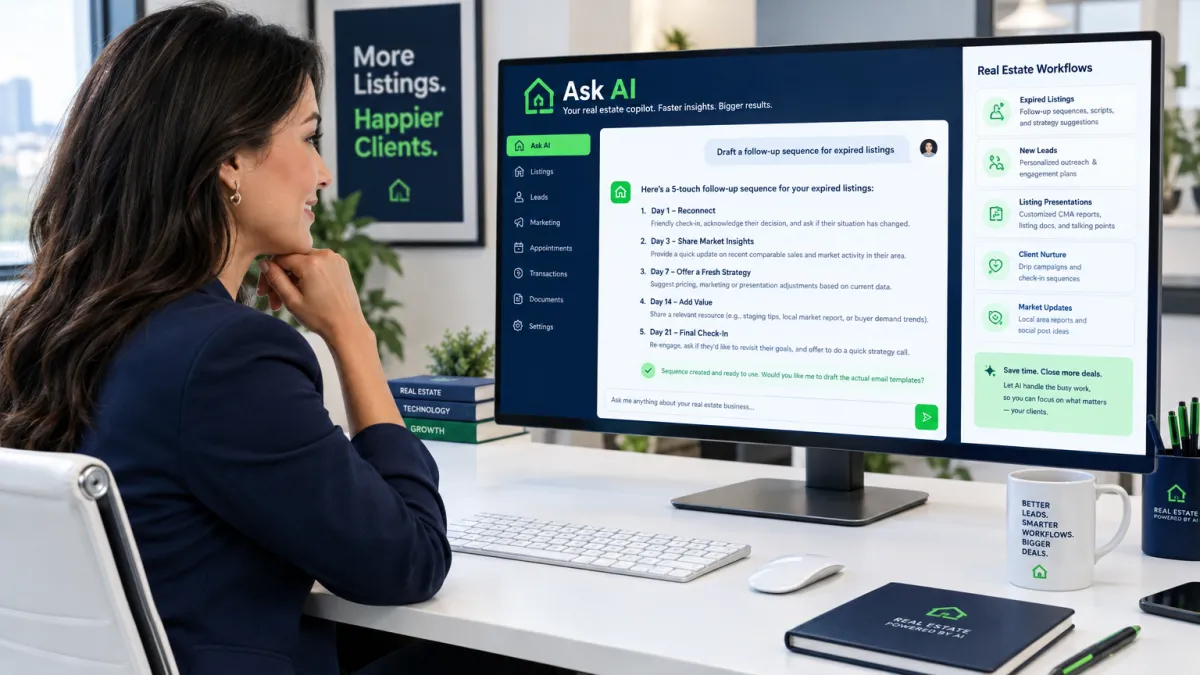
How Real Estate Agents Use Ask AI to Run Their Entire Follow-Up System With One Sentence
How Real Estate Agents Use Ask AI to Run Their Entire Follow-Up System With One Sentence
Most real estate agents have the same problem: they know they need better follow-up, but actually building a follow-up system feels like a project. Writing the texts, setting up the sequences, figuring out the triggers — it takes time that most agents just do not have between showings, negotiations, and everything else.
That is exactly what Ask AI is built to solve. Instead of clicking through menus and configuring automations manually, you just describe what you want in plain English — like you are talking to a colleague — and the system builds it for you.
Type a single sentence. Get a complete follow-up system. That is the short version. Here is how it actually works in practice.
What Is Ask AI — and Why Does It Matter for Real Estate Agents?
Ask AI is the conversational interface inside Leadengage AI Agents that lets you interact with your platform the way you would talk to a smart assistant. You describe an outcome, and the AI figures out how to build it.
For example, you could type: Create a 21-day text drip sequence for new buyer leads who came from a Facebook ad. Start soft, get more specific about their timeline by day 7, and ask for a call by day 14.
Ask AI reads that, generates the full sequence message by message with timing, and sets it up so it is ready to attach to your workflow. You review it, adjust anything you want, and activate it. The whole thing takes a few minutes instead of an afternoon.
This is not a chatbot that answers questions. It is an execution layer. The difference matters: Ask AI does not just talk about your pipeline — it works inside it.
Real Real Estate Use Cases Agents Are Running With Ask AI
The best way to understand Ask AI is to see what agents are actually using it for. These are the kinds of prompts real estate operators run every week.
Expired Listing Outreach Sequences
Expired leads are one of the highest-converting sources in real estate — if you get to them fast and stay consistent. The problem is most agents either follow up once or burn out manually dialing through a cold list.
With Ask AI, a listing agent can prompt: Build a 30-day outreach sequence for expired listing leads. Mix calls, texts, and voicedrops. Make the messaging empathetic in the first week and shift to value-focused by week three. The AI structures that entire campaign — contact timing, message angles, channel mix — and queues it up ready to deploy.
Open House Follow-Up Automation
Open houses generate leads in bursts, and most of those leads go cold within 48 hours if no one follows up. Ask AI can build a post-open-house follow-up sequence in seconds. Prompt it: Create a 7-day follow-up sequence for open house attendees. Day 1 should thank them for coming. Day 3 should ask if they have questions. Day 5 should mention similar properties. Day 7 should invite them to book a showing.
That sequence gets built, written, and staged — and next Saturday, every person who scanned your QR code at the open house enters it automatically.
Seller Lead Nurture for Long-Timeline Prospects
Not every seller lead is ready to list this month. Some are 6 to 12 months out, and most agents stop following up with them within a few weeks. Ask AI can build a long-form nurture track for these prospects: monthly market updates, equity check-in texts, and timely nudges timed around their stated move date.
One prompt creates months of consistent contact — without the agent manually writing a single message.
How Does Ask AI Know What to Build?
Ask AI uses the context you provide — lead type, goal, channel, tone, timeline — to generate workflows that map to how real real estate follow-up actually works. The more specific your prompt, the more dialed-in the output. But even a short, general prompt gets you a solid starting point you can refine.
The output connects directly to your Follow Up Boss pipeline and integrates natively with Follow Up Boss and other leading CRMs. Workflows Ask AI builds trigger off the same contact tags, stage changes, and action plans your team already uses. If you are already running Leadengage AI Agents to handle inbound leads and post-showing follow-up, Ask AI is how you build and update those agent workflows without touching a single settings screen.
Why Real Estate Agents Are Switching to This Approach
The traditional way to build a follow-up system in a CRM involves navigating nested menus, configuring triggers one by one, writing messages from scratch, testing timing, and often getting stuck halfway through and abandoning the whole thing.
Ask AI collapses that entire process into a conversation. You still make the decisions — what tone, what timing, what goal — but the AI does the construction work. For a solo agent or a lean team, that is the difference between having a follow-up system and not having one.
For teams and brokerages, it means your top producers best sequences can be recreated and standardized across agents in minutes. Instead of spending a half-day onboarding a new agent on your drip setup, you prompt Ask AI, review the output, and roll it out.
Is Ask AI Only for Building New Workflows?
No — and this is where it gets genuinely useful for agents who already have automations in place. Ask AI can also help you modify existing sequences. You can prompt things like: Take my current buyer nurture sequence and add a touchpoint on day 45 that mentions rising inventory in their target zip code — and it handles the edit.
You can also use it to troubleshoot, to write A/B variants of your existing messages, or to repurpose a sequence that has been working for buyers into a version tuned for sellers.
What Real Estate Operators Are Saying
Teams using Leadengage report that eliminating manual workflow setup is one of the biggest time savers in their week. When the barrier to building follow-up systems goes from a few hours of configuration to one sentence and a review, agents actually build them — and they actually use them. More follow-up means more conversations. More conversations close more deals from the database you already have.
Frequently Asked Questions About Ask AI for Real Estate
What is Ask AI in Leadengage?
Ask AI is a plain-English conversational interface inside Leadengage AI Agents that lets real estate agents describe a workflow, follow-up sequence, or automation goal in natural language. The AI builds the system based on your description — messages, timing, triggers, and all — without requiring manual configuration.
Do I need technical skills to use Ask AI?
No. Ask AI is designed so any real estate agent can use it without technical knowledge. If you can describe what you want to happen — like talking to an assistant — the AI handles the build. You review and activate the result.
Can Ask AI connect with Follow Up Boss?
Yes. Workflows and sequences that Ask AI builds connect to your Follow Up Boss pipeline through Leadengage native integration. Triggers, tags, and action plans all sync so the automation fires inside the CRM your team already uses.
What kinds of real estate workflows can Ask AI build?
Ask AI can build drip sequences, open house follow-up campaigns, expired listing outreach tracks, seller nurture sequences, post-closing review requests, database reactivation campaigns, and more. If you can describe the goal, Ask AI can structure a workflow around it.
How is Ask AI different from Conversation AI?
Conversation AI handles live, two-way conversations with leads — responding to inbound messages, qualifying prospects, and booking appointments automatically. Ask AI is the tool you use to build those automations and workflows. Think of Ask AI as the builder and Conversation AI as one of the tools it deploys.
Ready to describe your next follow-up system and have AI build it for you? Explore Leadengage AI Agents — including Ask AI, Conversation AI, Voice AI, and more — at leadengage.com/ai-agents.
